<?xml version="1.0" encoding="utf-8"?><feed xmlns="http://www.w3.org/2005/Atom" ><generator uri="https://jekyllrb.com/" version="3.10.0">Jekyll</generator><link href="https://www.codewithshabib.com/feed.xml" rel="self" type="application/atom+xml" /><link href="https://www.codewithshabib.com/" rel="alternate" type="text/html" /><updated>2026-03-31T20:16:42-04:00</updated><id>https://www.codewithshabib.com/feed.xml</id><title type="html">Code with Shabib</title><subtitle>Mobile Architect &amp; Tech Lead | iOS, Swift, React Native</subtitle><author><name>Ahmad Shabibul Hossain</name><email>ahmad@codewithshabib.com</email></author><entry><title type="html">Using Notion as Shared Memory Across Claude Surfaces</title><link href="https://www.codewithshabib.com/using-notion-as-shared-memory-across-claude-surfaces/" rel="alternate" type="text/html" title="Using Notion as Shared Memory Across Claude Surfaces" /><published>2026-03-31T00:00:00-04:00</published><updated>2026-03-30T20:00:00-04:00</updated><id>https://www.codewithshabib.com/using-notion-as-shared-memory-across-claude-surfaces</id><content type="html" xml:base="https://www.codewithshabib.com/using-notion-as-shared-memory-across-claude-surfaces/"><![CDATA[<figure class="post-figure">
  <img src="https://images.unsplash.com/photo-1674027444485-cec3da58eef4?auto=format&amp;fit=crop&amp;w=1600&amp;q=80&amp;ixlib=rb-4.1.0&amp;ixid=M3wxMjA3fDB8MHxwaG90by1wYWdlfHx8fGVufDB8fHx8fA%3D%3D" alt="Abstract sphere of interconnected dots and lines evoking neural connections and shared memory" />
  <figcaption>Photo by <a href="https://unsplash.com/@growtika">Growtika</a> on <a href="https://unsplash.com/photos/an-abstract-image-of-a-sphere-with-dots-and-lines-nGoCBxiaRO0">Unsplash</a></figcaption>
</figure>

<p>Over the last couple of weeks I’ve been trying to get Claude to work the way I actually work, which is mostly Claude Code on my laptop and then picking things up from my phone when I’m away from my desk. I have the same Anthropic account, I’m using the same project, I just want continuity between surfaces.</p>

<h2 id="the-memory-gap">The memory gap</h2>

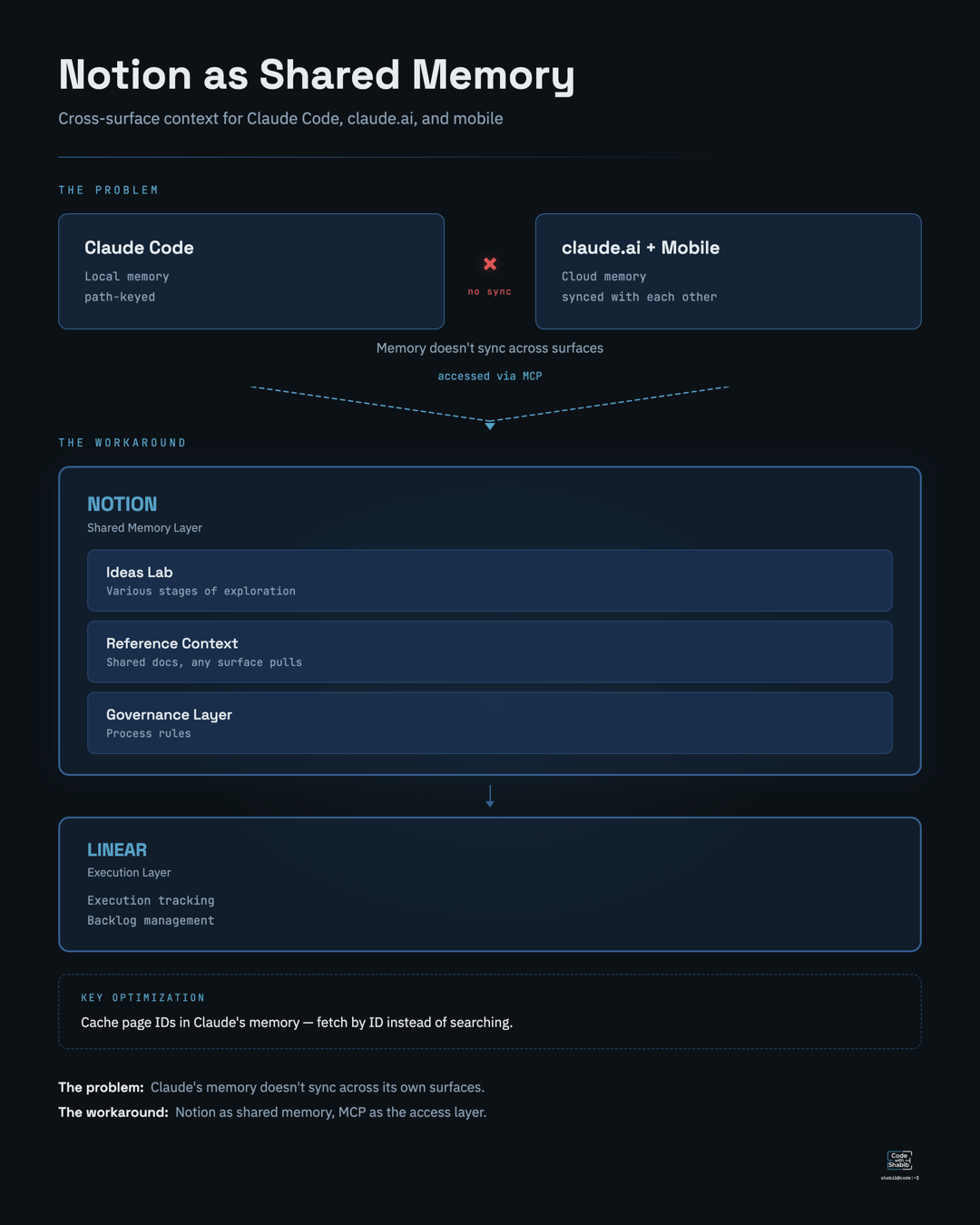
<p>Turns out that’s not how it works right now. Claude Code stores memory locally, keyed to the filesystem path of your project. The mobile app and <a href="http://claude.ai">claude.ai</a> have their own cloud-synced memory that’s completely separate. They’re on the same Anthropic account but they don’t share state. <a href="http://claude.ai/">claude.ai</a> and mobile do sync memory with each other now, but Claude Code remains completely isolated from both.</p>

<p>There’s a <a href="https://github.com/anthropics/claude-code/issues/25739">GitHub issue</a> with a growing thread of people describing exactly this problem and the workarounds are all over the place, Drive/Dropbox syncs, private Git repos to carry context, community tools that sort of work until your paths diverge between machines.</p>

<p>I stopped using Codex and ChatGPT and Perplexity a couple of weeks ago. That started with <a href="https://www.linkedin.com/posts/ahmadshabibulhossain_over-the-last-week-ive-been-messing-with-activity-7439711431534526465-DbsQ">a multi-agent workflow that surprised me by actually working end to end</a>, then <a href="https://www.linkedin.com/posts/ahmadshabibulhossain_cursor-had-been-my-tool-of-choice-for-most-activity-7440812522930110464-nzph">a broken connector that led me to try Claude for the same task</a> — and it just worked. Claude is the whole AI stack for me now, I’m on the Max plan, and this is not a casual experiment where I can just hop to another platform when something is annoying. So I needed to actually solve this.</p>

<h2 id="notion-as-the-shared-layer">Notion as the shared layer</h2>

<p>With a lot of trial and error what I ended up doing is using Notion as the shared memory layer. I have a workspace set up with multiple layers, an ideas lab for things in various stages of exploration, a context section with reference docs that any surface can pull from, and a governance layer for process rules.</p>

<p>Linear sits alongside it for execution tracking and backlog, but Notion is the one carrying the cross-surface context that Claude itself doesn’t share natively.</p>

<figure class="post-figure">
  <img src="/assets/images/2026-03-31-using-notion-as-shared-memory-across-claude-surfaces/notion-shared-memory-diagram-v3.png" alt="Diagram showing Claude Code and claude.ai/Mobile as isolated memory surfaces, with Notion as the shared context bridge via MCP, and Linear for execution tracking." style="height: auto; object-fit: contain;" />
</figure>

<h2 id="making-it-efficient">Making it efficient</h2>

<p>The part that took the most trial and error was making it efficient. Notion’s search index goes stale after edits, so I started caching page IDs directly in Claude’s memory so it can fetch by ID instead of searching. That one change cut out a surprising amount of wasted time and tokens. I also had to be deliberate about what lives in Notion versus what stays in Claude’s local memory, because pulling everything through MCP every session is expensive. Every page you load is tokens spent before the actual work even starts.</p>

<p>I can start a planning session on mobile, hand context to Claude Code for implementation, and pick it back up later without starting from scratch. That part is genuinely useful.</p>

<h2 id="the-tradeoffs">The tradeoffs</h2>

<p>But the token overhead is not small, the maintenance of keeping Notion and Linear telling the same story compounds over time, and I’m maintaining what is probably governance infrastructure built for a team when it’s really just me and a bunch of agents.</p>

<p>The slightly absurd part is that I’m essentially building an external brain for an AI and myself, because the AI’s own memory system doesn’t work across its own surfaces yet. That’s where we are in March 2026 apparently.</p>

<p>Anthropic is shipping things in this direction, <a href="https://coey.com/resources/blog/2026/03/17/anthropic-dispatch-turns-claude-into-your-always-on-creative-coworker/">Dispatch</a> as research preview, but it’s targeting a different problem. Nothing has connected into a full solution yet. There are people in the community building more purpose-built approaches to cross-surface context and memory sharing, and I’m paying close attention to how those shape up.</p>

<p>For now it works, honestly with tradeoffs, and I know I’ll need something more efficient as the workflow gets more complex. But I’m not gonna lie, the fact that it works at all across every surface has been worth the overhead so far (emphasis on “so far”).</p>]]></content><author><name>Ahmad Shabibul Hossain</name><email>ahmad@codewithshabib.com</email></author><category term="blog" /><category term="ai" /><category term="developer-tools" /><category term="architecture" /><category term="claude-code" /><category term="notion" /><category term="mcp" /><category term="agentic-systems" /><category term="cross-surface-memory" /><category term="developer-workflows" /><summary type="html"><![CDATA[Because Claude's own memory doesn't sync across them yet]]></summary><media:thumbnail xmlns:media="http://search.yahoo.com/mrss/" url="https://images.unsplash.com/photo-1674027444485-cec3da58eef4?auto=format&amp;fit=crop&amp;w=1600&amp;q=80&amp;ixlib=rb-4.1.0&amp;ixid=M3wxMjA3fDB8MHxwaG90by1wYWdlfHx8fGVufDB8fHx8fA%3D%3D" /><media:content medium="image" url="https://images.unsplash.com/photo-1674027444485-cec3da58eef4?auto=format&amp;fit=crop&amp;w=1600&amp;q=80&amp;ixlib=rb-4.1.0&amp;ixid=M3wxMjA3fDB8MHxwaG90by1wYWdlfHx8fGVufDB8fHx8fA%3D%3D" xmlns:media="http://search.yahoo.com/mrss/" /></entry><entry><title type="html">AI-Assisted Workflows: Back to Software Engineering Principles</title><link href="https://www.codewithshabib.com/ai-assisted-workflows-back-to-software-engineering-principles/" rel="alternate" type="text/html" title="AI-Assisted Workflows: Back to Software Engineering Principles" /><published>2026-02-24T00:00:00-05:00</published><updated>2026-03-01T19:00:00-05:00</updated><id>https://www.codewithshabib.com/ai-assisted-workflows-back-to-software-engineering-principles</id><content type="html" xml:base="https://www.codewithshabib.com/ai-assisted-workflows-back-to-software-engineering-principles/"><![CDATA[<figure class="post-figure">
  <img src="https://images.unsplash.com/photo-1489875347897-49f64b51c1f8?auto=format&amp;fit=crop&amp;w=1600&amp;q=80&amp;ixlib=rb-4.1.0&amp;ixid=M3wxMjA3fDB8MHxwaG90by1wYWdlfHx8fGVufDB8fHx8fA%3D%3D" alt="MacBook Pro with images of computer language codes" />
  <figcaption>Photo by <a href="https://unsplash.com/@casparrubin">Caspar Camille Rubin</a> on <a href="https://unsplash.com/photos/macbook-pro-with-images-of-computer-language-codes-fPkvU7RDmCo">Unsplash</a></figcaption>
</figure>

<p>I recently shared a thought on
<a href="https://www.linkedin.com/feed/update/urn:li:activity:7431098266190163968/">LinkedIn</a> about how
Markdown is becoming our primary language.</p>

<blockquote>
  <p>If you told me ten years ago that I would be spending a surprising amount of time fine-tuning
markdown files like <a href="https://agents.md/">AGENTS.md</a> or
<a href="https://cursor.com/docs/context/rules">.cursor/rules/*.mdc</a>, I would’ve laughed. I am not sure
how I feel about it yet. Mostly, I am amused.</p>
</blockquote>

<p>The AI-assisted workflow is evolving very quickly. First it was prompt engineering, then managing
context. These are still true, but as “vibe coding” started to become mainstream, people are
finally noticing the flaws in it.</p>

<p>They are realizing the reality of “AI slop” and re-learning that software engineering is not just
about writing code.</p>

<p>Writing the code is the last step. With this realization more people are starting to be systematic
and are going back to first principles.</p>

<h2 id="the-fragmentation-tax">The Fragmentation Tax</h2>

<p>This shift resulted in a flood of rules and workflows:
<a href="https://code.claude.com/docs/en/overview#customize-with-instructions-skills-and-hooks">Claude.md</a>,
<a href="https://github.com/bmad-code-org/BMAD-METHOD">BMAD</a>,
<a href="https://github.com/buildermethods/agent-os">Agent OS</a>, and
<a href="https://github.com/github/spec-kit">Spec Kit</a>. Each has its own system and style, but the core
idea is always the same.</p>

<p><em>Set proper boundaries, break down the problem, and plan small to build incrementally.</em></p>

<p>Sounds familiar?</p>

<p>As models become smarter and faster, code becomes cheaper. These guardrails are now a necessity.</p>

<p>We are seeing an innovation battle between AI companies, moving from simple IDEs to agentic ones.</p>

<p>Cursor popularized rules and plan mode. Claude gave us sub-agents. OpenAI introduced Codex rules.</p>

<p>Eventually we arrived at today. We have skills, agents, rules, hooks, and sub-agents. It is
overwhelming and non-standard.</p>

<p>Companies are trying to differentiate themselves so they can sell a product to as many people as
possible. This creates subtle differences in how things work.</p>

<p>Claude and Cursor call them hooks, Codex calls them
<a href="https://developers.openai.com/codex/app/automations/">automations</a> and rules. We have .cursor
folders, .claude folders, and .codex folders and Codex projects.</p>

<p>Each tool has its own system.</p>

<h2 id="the-portability-trap">The Portability Trap</h2>

<p>The fragmentation makes it harder for teams to generalize AI guardrails. I do not like being tied
to one system.</p>

<p>I started with VS Code, tried Windsurf and Claude Code, and finally settled on Cursor. But I am
liking Codex a lot these days, and things might change again.</p>

<p>How do I ensure the guardrails are set up correctly regardless of the tooling? There is also the
issue of porting guardrails when a new feature is introduced.</p>

<p>A lot of custom commands and Cursor rules can be moved to a project-specific skill. Some custom
commands can be ported to sub-agents and called from a hook.</p>

<p>It is actually fun and exciting to rediscover software engineering under this new lens.</p>

<h2 id="fundamentals-never-changed">Fundamentals Never Changed</h2>

<p>Are you seeing the similarities with pre-AI software engineering? Look closely.</p>

<p>The ecosystem looks fragmented on the surface, but the way through it feels very familiar. The
deeper I go, the less it feels like a tooling problem at all. It keeps revealing itself as a
structure problem.</p>

<p>Vendors will keep differentiating. Tools will keep evolving. And teams will still need a stable
layer above them.</p>

<p>I am finding myself pushing guardrails up to the repo level, treating them less like tool settings
and more like contracts.</p>

<p>Using conventions like AGENTS.md and skills as shared entry points, sharding documentation and
indexes so only the right context loads when needed, wiring hooks and scripts so behavior is
enforced regardless of which tool someone opens.</p>

<p>Sometimes that even means symlinking definitions so the same source of truth works across tools.</p>

<p>The tools are different. The interface is different. But the discipline required to build stable,
maintainable systems did not really change.</p>

<h2 id="the-software-engineering-reality">The Software Engineering Reality</h2>

<p>We spent years wondering if AI would replace the engineer. What we actually found is that it only
raised the stakes for how we design and structure systems.</p>

<p>The “boring” parts of software engineering, the boundaries, the contracts, and the modularity,
turned out to be the parts that actually support scale. Surprising? Or maybe not so much.</p>

<p>I am still amused by how much time I spend in Markdown, but I am also focused on the
responsibility.</p>

<p>People are starting to realize that writing code is only one layer of the job. The higher leverage
is in how the system is structured and orchestrated around it.</p>

<p>The proprietary vendor folders will keep shifting and the tools will keep evolving. But the
mission to build something that actually lasts is still our job. It always was.</p>

<p>That was, is and will be the core of Software Engineering.</p>]]></content><author><name>Ahmad Shabibul Hossain</name><email>ahmad@codewithshabib.com</email></author><category term="blog" /><category term="ai" /><category term="developer-tools" /><category term="architecture" /><category term="ai-assisted-workflows" /><category term="ai-guardrails" /><category term="developer-tools" /><category term="software-architecture" /><category term="software-engineering" /><category term="codex" /><category term="cursor" /><category term="claude-code" /><category term="markdown" /><summary type="html"><![CDATA[We spent years wondering if AI would replace the engineer. What we actually found is that it only raised the stakes for how we design and structure systems.]]></summary><media:thumbnail xmlns:media="http://search.yahoo.com/mrss/" url="https://images.unsplash.com/photo-1489875347897-49f64b51c1f8?auto=format&amp;fit=crop&amp;w=1600&amp;q=80&amp;ixlib=rb-4.1.0&amp;ixid=M3wxMjA3fDB8MHxwaG90by1wYWdlfHx8fGVufDB8fHx8fA%3D%3D" /><media:content medium="image" url="https://images.unsplash.com/photo-1489875347897-49f64b51c1f8?auto=format&amp;fit=crop&amp;w=1600&amp;q=80&amp;ixlib=rb-4.1.0&amp;ixid=M3wxMjA3fDB8MHxwaG90by1wYWdlfHx8fGVufDB8fHx8fA%3D%3D" xmlns:media="http://search.yahoo.com/mrss/" /></entry><entry><title type="html">The Quiet Sabotage: How “Frontend” Framing Undercuts Mobile Teams</title><link href="https://www.codewithshabib.com/the-quiet-sabotage-how-frontend-framing-undercuts-mobile-teams/" rel="alternate" type="text/html" title="The Quiet Sabotage: How “Frontend” Framing Undercuts Mobile Teams" /><published>2025-10-06T00:00:00-04:00</published><updated>2025-10-06T10:02:04-04:00</updated><id>https://www.codewithshabib.com/the-quiet-sabotage-how-frontend-framing-undercuts-mobile-teams</id><content type="html" xml:base="https://www.codewithshabib.com/the-quiet-sabotage-how-frontend-framing-undercuts-mobile-teams/"><![CDATA[<h4 id="mobile-is-not-your-frontend-its-your-frontline">Mobile Is Not Your Frontend. It’s Your Frontline.</h4>

<figure class="post-figure">
  <img src="https://images.unsplash.com/photo-1600856209923-34372e319a5d?auto=format&amp;fit=crop&amp;w=1600&amp;q=80" alt="Finger tapping on a glowing smartphone screen in the dark" />
  <figcaption>Photo by <a href="https://unsplash.com/@akshar_dave?utm_source=medium&amp;utm_medium=referral">Akshar Dave🌻</a> on <a href="https://unsplash.com?utm_source=medium&amp;utm_medium=referral">Unsplash</a></figcaption>
</figure>

<p>There’s a quiet lie sitting at the heart of how many companies build software. It starts with the
phrase “just frontend”. And it ends with mobile being treated like a second-class citizen.</p>

<p>Somewhere along the way, we started treating one of the most powerful software platforms in
history like an afterthought.</p>

<p>I am writing this piece to hopefully put an end to this mistake.</p>

<p>The other day, I was talking to a coworker who vented about a familiar frustration:</p>

<blockquote>
  <p>People treating mobile screens like they’re just another HTML website from the 90s, something
you can whip up in a day.</p>
</blockquote>

<p>That one sentence cracked open more than a decade of pent-up frustration for me. This isn’t the
first time I’ve heard it, and it won’t be the last.</p>

<p>I’ve been working across mobile and backend for more than 13 years. And, I’ve had this same
conversation in hallways, Slack threads, technical reviews, and interviews many times.</p>

<p>I’ve also seen the recruiting version of it, the “Frontend Mobile Developer” title that quietly
downgrades scope.</p>

<p>It’s almost the end of 2025, and everyone owns a smartphone. Entire businesses live or die by
their mobile experience.</p>

<p>If your company ships a serious mobile application, then mobile should be treated as a first-class
citizen. Otherwise, you are not actually serious about your product.</p>

<p>So let’s talk about it. Let me walk you through the exciting software engineering world called
mobile applications.</p>

<h2 id="web-client--mobile-app">Web Client ≠ Mobile App</h2>

<p>A “web client app” is what it says: <em>a web app</em>. Your mobile client app should also be what it
says: <em>a mobile app</em> not a web app knock-off.</p>

<p>Netflix, Shopify, Facebook, WhatsApp, and almost every major product keep separate clients for
web, iOS, Android, and desktop. They often share backends and business rules, but they do not
share platform architecture, lifecycle, or constraints.</p>

<p>Conflating them looks harmless, then it detonates scope, timelines, and ownership. A mobile
application is not a stealth request for a web copy. Treat them as distinct work-streams that
happen to consume the same/similar services.</p>

<h2 id="the-language-of-downgrading">The Language of Downgrading</h2>

<p>Browse job boards and you will still find “Frontend Mobile Developer” or “Mobile UI Engineer”
even in 2025!</p>

<p>Sounds harmless. It is not.</p>

<p>That phrasing tells candidates and teams that mobile is expected to be a presentation layer, not a
platform. It frames mobile engineers as component implementers, not owners of reliability,
performance, security, and experience.</p>

<p>Titles shape expectations. Expectations shape budgets. Budgets shape power.</p>

<p>When you linguistically relegate mobile to “frontend”, you justify lower investment, strip away
architectural ownership, and guarantee a weaker seat at the planning table.</p>

<p>Understand it as what it becomes: <em>a bad strategy, not just semantics</em>.</p>

<h2 id="the-technical-reality-everyone-ignores">The Technical Reality Everyone Ignores</h2>

<p>To be fair, there are apps where the mobile layer does very little. A glorified web view here, a
marketing wrapper there. Those are the exceptions, not the standard.</p>

<p>Modern smartphones are absurdly powerful. A mid-range smartphone from today can outperform
high-end computers from a decade ago. Successful products push significant work-load onto the
device because it improves reliability, latency, privacy, and user trust.</p>

<p>Peel back the layers of any serious product and the complexity it can run end-to-end:</p>

<ul>
  <li>Backend micro-services,</li>
  <li>Web frontends,</li>
  <li>Mobile UIs and mobile service layers,</li>
  <li>Device and IoT integrations,</li>
  <li>Background processing,</li>
  <li>Notifications,</li>
  <li>Location services,</li>
  <li>Streaming capabilities,</li>
  <li>On-device AI.</li>
</ul>

<p>Mobile sits at the intersection of all of it.</p>

<p>Here is what “not just frontend” looks like in practice:</p>

<ul>
  <li><strong>Architecture and Infrastructure:</strong> CI/CD, SAST, release trains, feature flags, staged
rollouts, crash-driven gates, app store constraints, hotfix lanes.</li>
  <li><strong>Concurrency and Lifecycle:</strong> Swift Concurrency, Kotlin Coroutines, foreground and background
transitions, scheduling work without killing battery or the UI thread.</li>
  <li><strong>Data and Reliability:</strong> Local persistence, conflict resolution, offline-first sync, metered
network behaviors, backoff and retry strategies.</li>
  <li><strong>Experience and System APIs:</strong> Push and in-app notifications, deep links, universal links,
widgets, location, Bluetooth, camera, biometrics.</li>
  <li><strong>Performance and Telemetry:</strong> Cold start and warm start budgets, ANR, memory pressure, disk
I/O, trace-level observability that respects user privacy.</li>
  <li><strong>Security and Compliance:</strong> Keychain and Keystore, device attestation, transport security, PII
controls, consent flow, RED, HIPAA and GDPR considerations.</li>
  <li><strong>Scale and Modularity:</strong> Micro-app / modular architectures (feature modules with independent
ownership and release), shared design systems, server-driven UI that does not break performance
or accessibility.</li>
  <li><strong>On-device AI:</strong> Lightweight models, embeddings, safety rails, and privacy-preserving inference
where it actually makes sense.</li>
</ul>

<blockquote>
  <p>Building mobile software is still building software.</p>
</blockquote>

<p>The same core challenges of architecture, infrastructure, and scale apply everywhere. Mobile adds
device constraints, stores, and modern-day expectations for speed and polish. Treating it as “just
frontend” is like staring at the tip of an iceberg and pretending the rest is optional.</p>

<figure class="post-figure">
  <img src="https://images.unsplash.com/photo-1636629216656-46e178cc4b2f?auto=format&amp;fit=crop&amp;w=1600&amp;q=80" alt="Iceberg floating in dark water with a much larger mass below the surface" />
  <figcaption>Photo by <a href="https://unsplash.com/@simonppt?utm_source=medium&amp;utm_medium=referral">SIMON LEE</a> on <a href="https://unsplash.com?utm_source=medium&amp;utm_medium=referral">Unsplash</a></figcaption>
</figure>

<h2 id="where-web-and-mobile-rhyme">Where Web and Mobile Rhyme</h2>

<p>Step back, and you’ll notice the same engineering backbone runs through both: <em>pipelines,
architecture, performance budgets, and strategic trade-offs</em>.</p>

<p>Mobile doesn’t sit beneath web; it operates alongside it, with shared principles but different
constraints. Recognizing the similarities clarifies why “frontend” is the wrong frame.</p>

<p>Similarities do not erase the differences. They highlight that “just frontend” is the wrong frame.</p>

<blockquote>
  <p>Mobile is a platform with its own rules of engagement.</p>
</blockquote>

<h2 id="why-this-misconception-persists">Why This Misconception Persists</h2>

<p>Ironically, mobile’s worst enemies are also it’s bigger power: <em>convenience and language</em>.</p>

<p>Convenience says, “We already have services and a web team, mobile can be thin”. Language says,
“It is just frontend”. Together, they underprice the work and overpromise delivery.</p>

<p>The result is predictable. Unrealistic timelines. Scope creep disguised as reuse. Talent churn when
mobile engineers realize they are not being asked to build a product, they are being asked to
decorate one.</p>

<p>A fragile architecture where web, mobile, and desktop are forced into one mental model that fits
none of them.</p>

<blockquote>
  <p>Most products do not win on slides or slogans. They win, or die, on mobile.</p>
</blockquote>

<p>On that note I am going to bet my hypothetical money that you’re reading this on a mobile device as
well if you have read it this far.</p>

<h2 id="receipts-you-can-use-in-the-room">Receipts You Can Use in The Room</h2>

<p>When someone waves off mobile as “just frontend”, use specifics, not volume.</p>

<ul>
  <li><strong>Latency and Reliability:</strong> Move work to the device when it cuts hops and flakiness. Show the
cold start budget, the offline path, and the retry matrix.</li>
  <li><strong>Security Posture:</strong> Explain device secrets, attestation, and why pushing critical flows to the
web view creates holes you do not want.</li>
  <li><strong>Performance Budgets:</strong> Present measured frame time, memory, and I/O costs. Show the cost of a
“simple” server-driven screen when it crosses a threshold.</li>
  <li><strong>Release Reality:</strong> App store review times, staged rollouts, crash thresholds, and why “just
ship a quick fix” is not a button you can press at 5 p.m.</li>
  <li><strong>Ownership Map:</strong> Draw the boundaries. Who owns sync, notifications, deep links, design system
tokens, analytics events, and privacy gates. Ambiguity is where projects go to die.</li>
</ul>

<p>Keep it concrete. Keep it calm. You are not pleading for respect. You are asserting reality.</p>

<h2 id="a-note-on-cross-platform">A Note On Cross-platform</h2>

<p>Cross-platform can be a smart business move. But it is not a blank check.</p>

<p>The moment you rely on deep native APIs, complex background work, or heavy performance
requirements, you pay a tax. That does not make cross-platform wrong. It makes architecture a
conscious decision, not a mantra.</p>

<p>I have shared my thoughts on this topic on a previous post, you can read it
<a href="/the-cost-of-ignoring-platform-power-in-mobile-development/" target="_blank" rel="noopener noreferrer">here</a>
if you want.</p>

<h2 id="what-leadership-should-change-this-quarter">What Leadership Should Change This Quarter</h2>

<p>If you want mobile to pay off, treat it like the frontline it is.</p>

<ul>
  <li>Scope mobile work as its own program, not a subtask of “frontend”.</li>
  <li>Use titles that match ownership. “Mobile Engineer/Developer”, “Mobile Platform
Engineer/Developer”, “iOS Engineer/Developer”, “Android Engineer/Developer”. Drop “frontend”
from mobile roles.</li>
  <li>Budget for observability, performance, and release operations. You would never ship backend
without it. Do not ship mobile without it.</li>
  <li>Put mobile in early on product strategy. Many “backend constraints” are actually solvable on
device with better user experience.</li>
  <li>Align incentives. Tie success to reliability, performance, and adoption, not just story points.</li>
</ul>

<p>If your job titles, hiring language, and org structure still treat mobile as “frontend”, then your
company is not building for 2025. It is playing catch-up in 2010.</p>

<h2 id="my-closing-notes">My Closing Notes</h2>

<p>When companies treat mobile as “just frontend”, they are not saving effort. They are surrendering
leverage.</p>

<p>Mobile is not the paint on the house. It is the front door, the hallway, and the living room where
your users decide whether to stay.</p>

<p>Respect it, invest in it, and give it the power it deserves.</p>

<p>If you still think a mobile app is just another HTML website from the 90s, remember: <em>users make
that judgment in seconds</em>.</p>

<blockquote>
  <p><strong>Footnote:</strong> you can see my frustration on this topic by just counting the phrase “just
frontend”!</p>
</blockquote>]]></content><author><name>Ahmad Shabibul Hossain</name><email>ahmad@codewithshabib.com</email></author><category term="blog" /><category term="architecture" /><category term="leadership" /><category term="mobile-development" /><category term="mobile-app-development" /><category term="engineering-leadership" /><category term="software-architecture" /><category term="frontend-framing" /><category term="mobile-platform" /><summary type="html"><![CDATA[Mobile Is Not Your Frontend. It’s Your Frontline.]]></summary><media:thumbnail xmlns:media="http://search.yahoo.com/mrss/" url="https://images.unsplash.com/photo-1600856209923-34372e319a5d?auto=format&amp;fit=crop&amp;w=1600&amp;q=80" /><media:content medium="image" url="https://images.unsplash.com/photo-1600856209923-34372e319a5d?auto=format&amp;fit=crop&amp;w=1600&amp;q=80" xmlns:media="http://search.yahoo.com/mrss/" /></entry><entry><title type="html">The Cost of Ignoring Platform Power in Mobile Development</title><link href="https://www.codewithshabib.com/the-cost-of-ignoring-platform-power-in-mobile-development/" rel="alternate" type="text/html" title="The Cost of Ignoring Platform Power in Mobile Development" /><published>2025-10-01T00:00:00-04:00</published><updated>2025-09-30T20:00:00-04:00</updated><id>https://www.codewithshabib.com/the-cost-of-ignoring-platform-power-in-mobile-development</id><content type="html" xml:base="https://www.codewithshabib.com/the-cost-of-ignoring-platform-power-in-mobile-development/"><![CDATA[<figure class="post-figure">
  <img src="https://images.unsplash.com/photo-1498050108023-c5249f4df085?auto=format&amp;fit=crop&amp;w=1600&amp;q=80" alt="Developer workspace with a laptop, phone, and code editor open on a desk" />
  <figcaption>Photo by <a href="https://unsplash.com/@kellysikkema">Kelly Sikkema</a> on <a href="https://unsplash.com/">Unsplash</a></figcaption>
</figure>

<p>Fear mongering and negativity sells more. Truth is often more nuanced.</p>

<p>Almost every day as I scroll through LinkedIn and Medium, I see the same headlines:</p>

<ul>
  <li>Native mobile development is dead.</li>
  <li>React Native/Kotlin Multiplatform Mobile/Flutter is the silver bullet for mobile development.</li>
</ul>

<p>And a few scrolls down I see the exact opposite:</p>

<ul>
  <li>Native development is the way to go.</li>
  <li>React Native/Kotlin Multiplatform Mobile/Flutter or cross platform development is dead.</li>
</ul>

<p>These takes surely get tons of clicks, but they miss the truth intentionally. If there really were
a silver bullet, we would all already be using it.</p>

<p>In 2025, everyone is using a smartphone and your brand value depends on it. If you are not already
treating your mobile application as a first class citizen, you are not playing the game right.</p>

<p>Every time I have been in a strategy meeting, cross-platform comes up. And sooner or later, it
runs into the same reality: long term goal versus disruption.</p>

<p>Cross-platform teams often wait many months before stable packages to appear, and still have to
write native code. Even smaller features like Live Activities lagged support for months.</p>

<p>iOS 26 and Liquid Glass are the latest examples of this disruption.</p>

<p>Apple has provided a temporary compatibility mode in Xcode 26 to opt out of Liquid Glass, but it
is intended to be removed by iOS 27.</p>

<p>That means every cross-platform framework, whether Compose Multiplatform, Flutter, or React Native,
will wrestle with weird bugs and missing pieces for a while.</p>

<p>This pattern repeats with every major platform shift, but iOS 26 exposes the deepest cracks yet.</p>

<p>Flutter, to its credit, has pushed the bar on rendering consistency and often leads in
cross-platform innovation. But Liquid Glass exposes the limits of that model. Its rendering engine
can only approximate the effect, and today there is no official Cupertino support. Developers lean
on community packages, which often carry reported GPU overhead and risk of abandonment.</p>

<p>React Native fares better since it uses UIKit components. But it still forces teams to bridge
<code class="language-plaintext highlighter-rouge">UIGlassEffect</code> for full integration.</p>

<p>KMM shares business logic across platforms while typically using native UI frameworks (Jetpack
Compose on Android, SwiftUI/UIKit on iOS). Teams can optionally use Compose Multiplatform for
shared UI. It reached stable status in May 2025, though iOS apps may feel Android-like without
custom design systems. So teams must decide where to draw the line.</p>

<p>The real cost hits by iOS 27. Once Apple removes the compatibility opt-out, Flutter apps risk
looking dated against native apps and even React Native competitors. It potentially becomes a
fundamental mismatch when platforms flex control.</p>

<p>It is the nature of the game. Platforms always have and will look out for themselves first.</p>

<p>Each framework carries its own tax, mainly in performance, look and feel, or duplication. None can
actually escape Apple or Google’s rule shifts.</p>

<p>On the other hand native development is costly and carries almost 100% duplicate efforts on each
platform. You should clearly understand this when you choose a tech stack.</p>

<p>Apple and Google will copy each other when it helps, and just as quickly double down on
distinctions to protect their brand, retain developers, and keep customers locked in.</p>

<p>Companies building apps, meanwhile, are motivated by efficiency, cost savings, and reach.</p>

<p>Every company or brand tries to push their own design as common UX, meaning apps should look the
same on both iOS and Android.</p>

<p>This pushed the envelope for cross platform development and trying to have the same UX on both
platforms.</p>

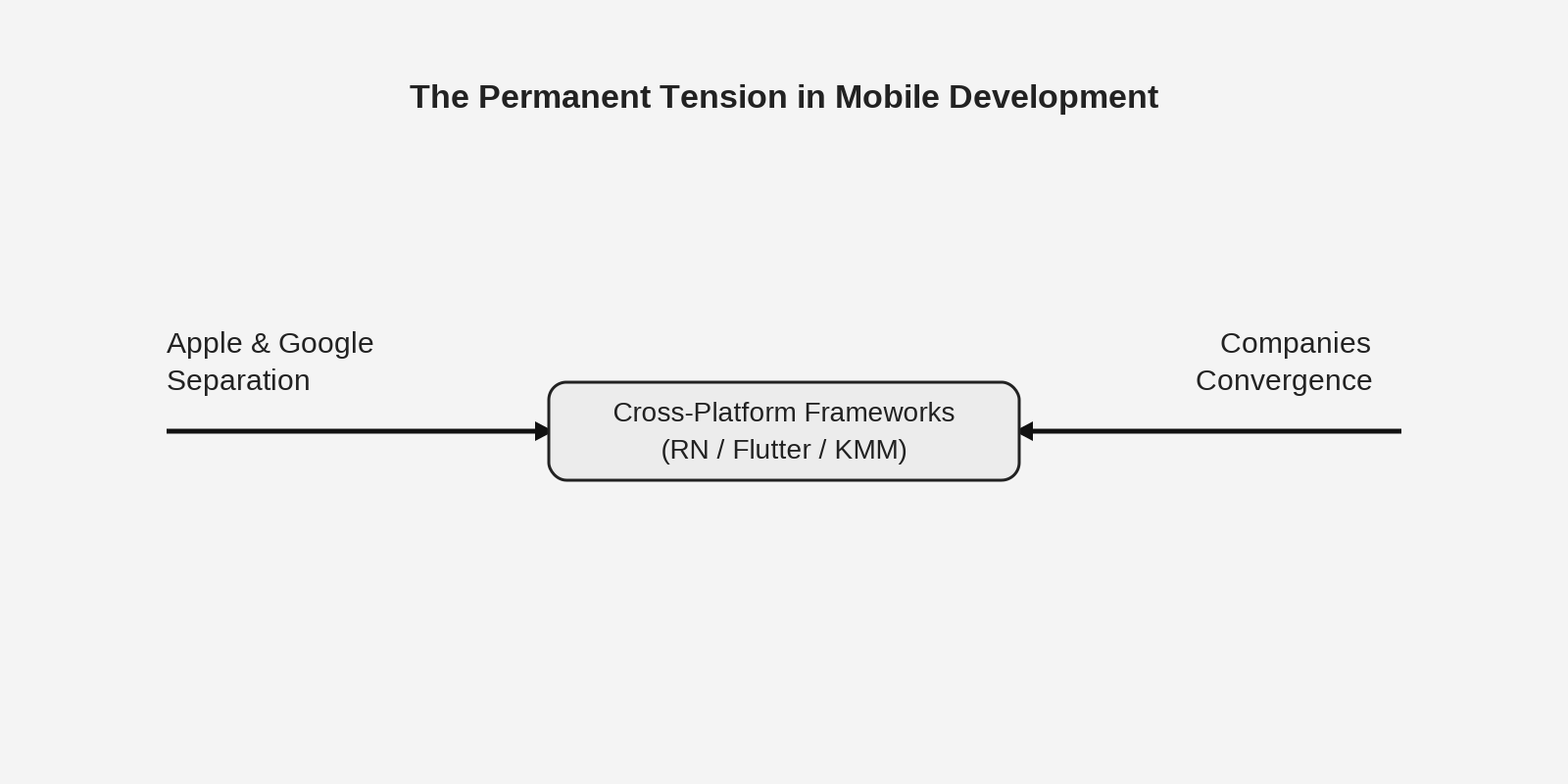
<p>This creates the permanent tension: platforms push separation, application builders push
convergence. That is why Liquid Glass and Material You look so different, and why they always will.</p>

<figure class="post-figure">
  <img src="/assets/images/2025-10-01-the-cost-of-ignoring-platform-power-in-mobile-development/separation-vs-convergence.svg" alt="The Permanent Tension in Mobile Development" />
  <figcaption>The real battle isn’t Native vs Cross-Platform, it’s Separation vs Convergence (Image generated with help of AI)</figcaption>
</figure>

<p>And it is not just the platforms. Each ecosystem has loyal users who are used to its design
system. iOS users expect a different rhythm of navigation, controls, and motion than Android users
do.</p>

<p>Too many teams forget that most people do not switch between iOS and Android. They are loyal to
one, and they expect it to feel native. Forcing sameness across both ignores that reality. Which is
why UX expectations need to be treated as seriously as technical tradeoffs, and considered early in
design, not patched in later.</p>

<p>My stance comes from leading native iOS and Android teams, shipping both native and cross platform
apps at scale, and evaluating cross platform frameworks for shared code.</p>

<p>It is not as simple as saying we should go React Native. It should be a well thought out solution,
so that cross platform does not become an illusion of choice, but a conscious engineering decision
with known tradeoffs.</p>

<p>For your specific use case, if cross-platform cannot clearly beat native on cost or delivery speed,
it stops being strategy and starts being liability for your team.</p>

<p>I always fallback to the lesson: share code where it provides clear value, keep UX platform-native,
and when your app involves hardware or BLE, go native at least for those layers.</p>

<p>Native will always provide better stability, performance, and long-term maintainability with first
class support.</p>

<p>We should also be cautious with vendor SDKs and third-party dependencies, they often introduce
hidden lock-in.</p>

<p>If you are deciding on your mobile stack, ask yourself these:</p>

<ul>
  <li>Are you ready to deal with platform changes and sudden breaking updates?</li>
  <li>Does your app need hardware features, instant access to new OS capabilities, or pixel-perfect
system look and feel?</li>
  <li>Do you care more about long-term maintainability or shipping quick MVPs across iOS and Android?</li>
  <li>Are you staffed to handle native fire drills, or do you need every ounce of speed and
code-sharing?</li>
  <li>Do you want first class platform support?</li>
</ul>

<p>Draw your lines where it actually matters for your users and business, not where the headlines
claim the future lives.</p>

<p>In the end, the strongest teams make choices based on reality, not hype. Do not build for trends.
Build for the platforms, for your users, and for longevity. Know that Apple and Google’s
incentives shape the game.</p>

<p>And above all, if you are working in mobile, whether as a cross-platform or native developer, learn
architecture and platform quirks deeply. Tools come and go, design systems evolve, frameworks rise
and fade.</p>

<p>The best defense is not a shiny framework. It is a clear understanding of what your app and your
team truly need. That is how you stop chasing silver bullets and start making architecture
decisions that stand the test of time.</p>]]></content><author><name>Ahmad Shabibul Hossain</name><email>ahmad@codewithshabib.com</email></author><category term="blog" /><category term="ios" /><category term="react-native" /><category term="architecture" /><category term="mobile-architecture" /><category term="platform-power" /><category term="react-native" /><category term="flutter" /><category term="kotlin-multiplatform" /><category term="compose-multiplatform" /><category term="ios" /><category term="native-development" /><category term="product-strategy" /><summary type="html"><![CDATA[Fear mongering and negativity sells more. Truth is often more nuanced.]]></summary><media:thumbnail xmlns:media="http://search.yahoo.com/mrss/" url="https://images.unsplash.com/photo-1498050108023-c5249f4df085?auto=format&amp;fit=crop&amp;w=1600&amp;q=80" /><media:content medium="image" url="https://images.unsplash.com/photo-1498050108023-c5249f4df085?auto=format&amp;fit=crop&amp;w=1600&amp;q=80" xmlns:media="http://search.yahoo.com/mrss/" /></entry><entry><title type="html">What Is Tokenization? (And Why It Matters for Everyday AI)</title><link href="https://www.codewithshabib.com/what-is-tokenization-and-why-it-matters-for-everyday-ai/" rel="alternate" type="text/html" title="What Is Tokenization? (And Why It Matters for Everyday AI)" /><published>2025-06-04T00:00:00-04:00</published><updated>2025-06-03T23:25:00-04:00</updated><id>https://www.codewithshabib.com/what-is-tokenization-and-why-it-matters-for-everyday-ai</id><content type="html" xml:base="https://www.codewithshabib.com/what-is-tokenization-and-why-it-matters-for-everyday-ai/"><![CDATA[<p>If you’re playing with AI and LLMs, you’ve probably seen this viral post somewhere:</p>

<blockquote>
  <p>Try asking this question to ChatGPT: “How many ‘r’s are in the word ‘strawberry’?”
You’ll see ChatGPT respond with “2” although there are 3 ‘r’s in the word.</p>
</blockquote>

<p>Ever wondered why? I did too, and what I discovered changed how I think about every AI interaction.</p>

<p>This isn’t about AI being bad at counting. It’s about something more fundamental that explains a lot of those weird behaviors you’ve probably noticed but couldn’t quite put your finger on.</p>

<p>Before diving into the strawberry mystery, let’s talk about the “<em>context window</em>”: the memory limit of large language models. Imagine the AI’s brain as a glass, it can only hold so much water at once. In the same way, an LLM can only “remember” a certain amount of information at a time, measured not in words or sentences, but in <strong>tokens</strong> — the small pieces that make up our input and the AI’s responses.</p>

<p>If you try to pour in too much, the glass overflows and the earliest drops spill out. For AI, this means if your conversation or document is too long, the model loses track of what came first, it simply can’t fit everything into its working memory. That’s why understanding what fits in this context window is so important for getting the best results from AI.</p>

<p>You can read more about context window in <a href="https://www.codewithshabib.com/understanding-llms-context-windows-and-token-limits/">this post</a>.</p>

<h2 id="what-i-wish-id-understood-about-tokenization-earlier">What I Wish I’d Understood About Tokenization Earlier</h2>

<p>Tokenization is how AI breaks down your text before it can understand anything you’re saying. Instead of reading full sentences like humans do, AI needs to slice everything into smaller pieces called tokens.</p>

<p>But here’s what took me way too long to internalize: this isn’t just a preprocessing step. This fundamentally shapes every interaction you have with AI.</p>

<p>Think of it like packing a lunchbox. You can’t just throw in whole meals, everything needs to be cut into bite-sized pieces first. But once you’ve chopped everything up, you can never see the original whole sandwich or apple. You only see the individual chopped pieces.</p>

<p><strong>What are tokens?</strong> They can be:</p>
<ul>
  <li>Individual words (“<em>hello</em>”)</li>
  <li>Parts of words (“<em>un-</em> or <em>-ing</em>”)</li>
  <li>Single characters</li>
  <li>Punctuation marks</li>
  <li>Spaces</li>
</ul>

<h2 id="why-cant-ai-just-read-normal-text">Why Can’t AI Just Read Normal Text?</h2>

<p>Machines don’t understand words the way humans do. LLMs are fundamentally number-crunching systems built on neural networks,they operate on numerical data, not raw text.</p>

<p>Here’s what clicked for me: every conversation you have with AI is actually a conversation with a very sophisticated calculator.</p>

<p>The process works like this:</p>
<ol>
  <li><strong>Your input:</strong> “<em>Chatbots are helpful.</em>”</li>
  <li><strong>Tokenization:</strong> Breaks it into [“<em>Chatbots</em>”, “<em>are</em>”, “<em>helpful</em>”, “<em>.</em>”]</li>
  <li><strong>Numerical mapping:</strong> Each token gets a unique number ID</li>
  <li><strong>AI processing:</strong> The model works with these numbers</li>
  <li><strong>Response generation:</strong> AI outputs number sequences</li>
  <li><strong>Decoding:</strong> Numbers get converted back to readable text</li>
</ol>

<p>This number conversion isn’t just a technical detail — it’s why AI behaves the way it does.</p>

<h2 id="how-modern-tokenization-actually-works">How Modern Tokenization Actually Works</h2>

<p>Most current LLMs use <strong>subword tokenization</strong>, which is smarter than just splitting by spaces. Instead of treating every word as one token, it breaks things down further:</p>

<ul>
  <li>“<em>unhappiness</em>” becomes [“<em>un”, “_happi”, “_ness</em>”]</li>
  <li>“<em>tokenization</em>” becomes [“<em>token”, “_ization</em>”]</li>
  <li>“<em>internationalization</em>” becomes [“<em>inter”, “_national”, “_ization</em>”]</li>
</ul>

<p>This helps AI handle rare words and different languages more efficiently by recognizing familiar word parts.</p>

<p>Now, you might be thinking “<em>okay, that’s interesting, but why should I care about the technical details?</em>”. Here’s the thing, once you understand how this tokenization process actually works, suddenly all those weird AI behaviors you’ve probably noticed start making perfect sense.</p>

<h2 id="why-this-matters-for-your-daily-ai-use">Why This Matters for Your Daily AI Use</h2>

<p>Understanding tokenization isn’t academic, it directly impacts your experience with AI tools. Once I understood this, suddenly all those weird AI behaviors started making sense.</p>

<h3 id="prompt-limits-and-cut-off-responses"><strong>Prompt Limits and Cut-off Responses</strong></h3>

<p>Every LLM has a token limit that covers both your input and the AI’s response. Hit this limit, and:</p>
<ul>
  <li>Responses get truncated mid-sentence</li>
  <li>Earlier conversation context gets lost</li>
  <li>The AI might produce errors or inconsistencies</li>
</ul>

<p>You know that frustrating moment when ChatGPT suddenly stops mid-sentence? It’s not being dramatic, it literally can’t fit any more tokens in its context window.</p>

<h3 id="token-counting-isnt-intuitive"><strong>Token Counting Isn’t Intuitive</strong></h3>

<p>Here’s something that caught me off guard: <em>not all text is created equal in token terms</em>.</p>

<p>You might think “<em>artificial intelligence</em>” and “<em>AI stuff</em>” would use roughly the same number of tokens since they’re similar length. But “<em>artificial intelligence</em>” gets split into [“<em>artific</em>”, “<em>ial</em>”, “<em>intellig</em>”, “<em>ence</em>”] (4 tokens), while “<em>AI stuff</em>” is just [“<em>AI</em>”, “<em>stuff</em>”] (2 tokens).</p>

<p>This matters because:</p>
<ul>
  <li>On average, 1 English word ≈ 1.3 tokens, but technical terms can be much higher</li>
  <li>That fancy vocabulary you’re using? It’s costing you more tokens than simple words</li>
  <li>Every emoji 🤖 might be 2-3 tokens, so your friendly prompts are more expensive than you think</li>
  <li>Even spaces and punctuation marks count as separate tokens</li>
</ul>

<p>So when you hit a token limit, it’s not necessarily because your prompt was too long—it might be because you used too many uncommon words.</p>

<h3 id="why-your-non-english-prompts-feel-more-expensive"><strong>Why Your Non-English Prompts Feel More Expensive</strong></h3>

<p>If you’ve ever noticed AI seems to work better in English, tokenization is part of the reason why.</p>

<p>Let’s say you want to ask “<em>How are you</em>?” In English, that’s [“<em>How</em>”, “<em>are</em>”, “<em>you</em>”, “<em>?</em>”] - 4 tokens. But <em>“তুমি কেমন আছ?”</em> (<em>tumi kemon acho?</em>) in Bengali becomes a mess of individual characters and syllables - often 8-12 tokens for the same simple question.</p>

<p>This isn’t just about cost:</p>
<ul>
  <li>Your Bengali prompts hit token limits faster</li>
  <li>The AI has less <strong>“room”</strong> to give detailed responses in Bengali</li>
  <li>Non-English conversations feel more constrained because they literally are</li>
</ul>

<p>If you’re multilingual, you’ve probably noticed ChatGPT feels different in different languages. Now you know part of why.</p>

<h3 id="the-strawberry-mystery-solved"><strong>The Strawberry Mystery Solved</strong></h3>

<p>Remember that strawberry counting problem? Here’s what’s actually happening—and it’s kind of brilliant once you see it.</p>

<p>When you type “<em>strawberry</em>,” the AI doesn’t see <em>s-t-r-a-w-b-e-r-r-y</em>. Instead, it sees three separate chunks: “<em>str</em>” + “<em>aw</em>” + “<em>berry</em>”. To the AI, these aren’t even letters anymore, they’re just number codes: [496, 675, 15717].</p>

<p>So when you ask “<em>how many r’s are in strawberry</em>,” the AI is essentially thinking:</p>

<blockquote>
  <p>“Let me count the r’s in number 496… okay, one r. Now in number 675… no r’s here. Now in number 15717… one r. Total: two r’s.”</p>
</blockquote>

<p>It’s not that the AI is bad at counting. It’s that from its perspective, it’s never actually seeing the word “<em>strawberry</em>” as a complete sequence of letters. It’s like asking someone to count the number of times the letter ‘e’ appears in a sentence, but you’ve handed them a bunch of puzzle pieces instead of the full sentence.</p>

<p>This blew my mind when I realized it explains so many other weird AI behaviors.</p>

<h2 id="when-this-knowledge-actually-saves-you-time-and-money">When This Knowledge Actually Saves You Time and Money</h2>

<p>Understanding tokenization isn’t just interesting, it solves real problems you’re probably having right now.</p>

<p><strong>That Moment When Your API Bill Spikes</strong></p>

<p>If you’re using AI APIs, you pay per token. I learned this the hard way when my bill jumped 40% one month. Turns out, I’d started using more technical jargon in my prompts. “<em>Utilize sophisticated algorithms</em>” costs 6 tokens, while “<em>use smart code</em>” costs 3 tokens for basically the same meaning.</p>

<p><strong>Why Your Long Conversations Get Weird</strong></p>

<p>Ever notice how ChatGPT starts giving inconsistent answers in really long conversations? You’re hitting the context window limit. The AI literally can’t remember what you talked about 20 messages ago because those tokens got pushed out to make room for new ones.</p>

<p><strong>The Frustrating Mid-Sentence Cutoff</strong></p>

<p>That moment when the AI stops responding mid-thought? It hit its token limit. Understanding this helped me structure my prompts to leave more room for complete responses.</p>

<p><strong>Why Some Prompts Just Work Better</strong></p>

<p>Better understanding of how AI processes text leads to more predictable outcomes. Instead of wondering why one prompt works and another doesn’t, you can start to see the patterns.</p>

<p><strong>Privacy considerations</strong></p>

<p>While tokenization itself doesn’t create privacy risks, the content being tokenized might. Personal information in training data or prompts can potentially lead to privacy breaches, the risk comes from the sensitive content, not the tokenization process itself.</p>

<h2 id="the-bottom-line">The Bottom Line</h2>

<p>Every interaction with an LLM starts and ends with tokenization. Your text gets broken into tokens, converted to numbers, processed by the AI, then decoded back into readable text.</p>

<p>Think of it like packing a lunchbox for AI. You’ve got a big sandwich, grapes on stems, and whole carrots. You can’t just throw them in: you need to slice the sandwich, separate the grapes, and cut the carrots into sticks.</p>

<p>Tokenization works the same way. Your text is the whole meal, the tokenizer is your knife, and tokens are the bite-sized pieces that fit into the AI’s “<em>lunchbox</em>”. The AI needs these discrete, numbered pieces to understand and process your input, and it can never reconstruct the original whole from these pieces.</p>

<h2 id="tokenization-aware-prompting-practical-tips">Tokenization-Aware Prompting: Practical Tips</h2>

<p>Understanding tokenization can make you a more effective prompt writer. Here are key considerations:</p>

<h3 id="case-sensitivity-matters-more-than-you-think"><strong>Case Sensitivity Matters More Than You Think</strong></h3>

<p>Here’s something that bit me while writing prompts: “<em>Swift</em>”, “<em>swift</em>”, and “<em>SWIFT</em>” are completely different tokens to the AI.</p>

<p>I was writing prompts like “<em>Use SWIFT to solve this</em>” for emphasis, not realizing the AI had to work harder to connect “<em>SWIFT</em>” with all its training about “<em>Swift</em>” programming. Plus, “<em>SWIFT</em>” could just as easily refer to the banking protocol, adding another layer of confusion. My prompts were less effective because I was accidentally using unfamiliar tokens.</p>

<p><strong>What I do now:</strong> Stick to standard capitalization unless I specifically need emphasis. “<em>Use Swift to solve this</em>” works better than “<em>Use SWIFT to solve this</em>” because the AI has seen that exact token pattern thousands of times in its training.</p>

<p>The AI isn’t reading for meaning the way you are, it’s pattern matching tokens it’s seen before.</p>

<h3 id="why-grammar-actually-affects-ai-performance"><strong>Why Grammar Actually Affects AI Performance</strong></h3>

<p>I used to be pretty casual about typos in my prompts - figured the AI was smart enough to figure out what I meant. Although this is mostly true, I started noticing my quick, typo-filled prompts were sometimes getting oddly inconsistent responses.</p>

<p>When you write “<em>Can you help me optimize this algoritm?</em>”, the AI sees [“<em>Can</em>”, “<em>you</em>”, “<em>help</em>”, “<em>me</em>”, “<em>optimize</em>”, “<em>this</em>”, “<em>algoritm</em>”, “<em>?</em>”]. That misspelled “<em>algoritm</em>” token is unfamiliar — the AI has seen “<em>algorithm</em>” thousands of times, but “<em>algoritm</em>” barely exists in its training.</p>

<p><strong>The difference is measurable:</strong> Well-spelled, grammatically correct prompts get more accurate responses because they use token patterns the AI recognizes. It’s not about being formal; it’s about speaking the AI’s language more fluently.</p>

<p>This is why that perfectly clear prompt you typed quickly on your phone sometimes gets weird responses. Those typos aren’t just cosmetic, they’re creating token confusion.</p>

<h3 id="format-choice-affects-token-efficiency"><strong>Format Choice Affects Token Efficiency</strong></h3>

<p>Different data formats consume vastly different numbers of tokens:</p>

<p>When converting the same data to different formats: JSON used 13,869 tokens, YAML used 12,333 tokens, and Markdown used only 11,612 tokens — <a href="https://community.openai.com/t/markdown-is-15-more-token-efficient-than-json/841742">a 15% improvement over JSON</a>.</p>

<p>Type definitions use 60% fewer tokens than JSON schemas with no loss of information. For example, instead of complex JSON schema syntax, simple type definitions like <code class="language-plaintext highlighter-rouge">{ "name": string, "age": int }</code> are much more token-efficient.</p>

<p><strong>Best practice:</strong> For structured output, prefer YAML or Markdown over JSON when possible. Use simple type definitions instead of verbose JSON schemas.</p>

<h3 id="special-characters-and-symbols"><strong>Special Characters and Symbols</strong></h3>

<p>Special characters, punctuation, and symbols can be tokenized unpredictably. Each punctuation mark might be its own token, and complex symbols might be split into multiple tokens. Even trailing spaces can create unexpected tokens — a space at the end of your prompt might affect how the AI interprets what comes next.</p>

<p>Some characters you use might not exist in the AI’s vocabulary at all. When this happens, they get converted to an “<em>unknown</em>” (<code class="language-plaintext highlighter-rouge">[UNK]</code>) token (think of it like the AI saying “<em>I don’t recognize this symbol</em>”), which means it loses the specific meaning you intended.</p>

<p><strong>Best practice:</strong> Use standard punctuation and avoid unnecessary special characters. Watch out for extra spaces at the end of your prompts.</p>

<h3 id="coherence-over-brevity"><strong>Coherence Over Brevity</strong></h3>

<p>Non-English languages often require significantly more tokens for the same content. For example, “<em>Cómo estás</em>” in Spanish contains 5 tokens for just 10 characters. This leads to higher costs and potentially worse performance.</p>

<p><strong>Best practice:</strong> When working with non-English content, budget for higher token usage and test thoroughly.</p>

<h3 id="understanding-ais-special-vocabulary"><strong>Understanding AI’s Special Vocabulary</strong></h3>

<p>AI models have special “<em>control tokens</em>” built into their vocabulary — like invisible punctuation marks that help organize conversations. These include tokens that signal “<em>start of text</em>,” “<em>end of response</em>,” or “<em>unknown word</em>.” You can’t see these in normal use, but they’re working behind the scenes to help the AI understand structure and context.</p>

<p>This is why AI sometimes behaves differently when you format text in certain ways, you might accidentally trigger patterns the AI associates with these special structural markers.</p>

<p><strong>Best practice:</strong> Stick to natural, conversational language. Avoid trying to mimic technical formatting unless you specifically need it.
While shorter prompts use fewer tokens, overly compressed prompts can reduce response quality. Give the model room to think.</p>

<p><strong>Best practice:</strong> Be concise but complete. Don’t sacrifice clarity to save a few tokens.</p>

<p>Every interaction with an LLM starts and ends with tokenization. Your text gets broken into tokens, converted to numbers, processed by the AI, then decoded back into readable text.</p>

<p>Understanding this process helps you:</p>
<ul>
  <li>Write more effective prompts</li>
  <li>Anticipate when you’ll hit limits</li>
  <li>Understand why AI sometimes struggles with certain tasks</li>
  <li>Manage costs if you’re using AI APIs</li>
  <li>Get better results from AI tools</li>
</ul>

<p>Tokenization is the invisible translator between human language and machine understanding. The better you understand it, the better you’ll work with AI.</p>

<h2 id="want-to-dig-deeper">Want to Dig Deeper?</h2>

<p>If this sparked your curiosity about tokenization (like it did for me), here are the resources that helped me piece this together:</p>

<p><strong>Start here if you’re new to this:</strong> <a href="https://www.grammarly.com/blog/ai/what-is-tokenization/">Grammarly’s guide</a> does a solid job explaining the basics without getting too technical.</p>

<p><strong>For the technical details:</strong> <a href="https://christophergs.com/blog/understanding-llm-tokenization">Christopher’s deep dive</a> is where I finally understood the <code class="language-plaintext highlighter-rouge">subword</code> tokenization mechanics that I glossed over here.</p>

<p><strong>The case sensitivity thing that surprised me:</strong> <a href="https://markhazleton.com/articles/the-impact-of-input-case-on-llm-categorization.html">Mark’s analysis</a> has the data on how much capitalization actually affects AI performance.</p>

<p><strong>Official documentation:</strong> <a href="https://help.openai.com/en/articles/4936856-what-are-tokens-and-how-to-count-them">OpenAI’s token guide</a> is dry but accurate if you want the authoritative explanation.</p>

<p><strong>Token optimization tricks:</strong> <a href="https://www.boundaryml.com/blog/type-definition-prompting-baml">This BoundaryML post</a> opened my eyes to how much tokens I was wasting with verbose prompting patterns.</p>]]></content><author><name>Ahmad Shabibul Hossain</name><email>ahmad@codewithshabib.com</email></author><category term="blog" /><category term="AI" /><category term="GenerativeAI" /><category term="PromptEngineering" /><category term="Tokenization" /><category term="AI" /><category term="LLMs" /><category term="GenerativeAI" /><category term="ArtificialIntelligence" /><category term="PromptEngineering" /><category term="MachineLearning" /><category term="DeepLearning" /><category term="Tech" /><category term="Innovation" /><category term="AIDevelopment" /><summary type="html"><![CDATA[Tokenization is the process of breaking down text into smaller units called tokens. It's a fundamental concept in natural language processing and is used in a variety of applications, including search engines, chatbots, and voice assistants.]]></summary></entry><entry><title type="html">Understanding LLMs: Context Windows and Token Limits</title><link href="https://www.codewithshabib.com/understanding-llms-context-windows-and-token-limits/" rel="alternate" type="text/html" title="Understanding LLMs: Context Windows and Token Limits" /><published>2025-05-31T00:00:00-04:00</published><updated>2025-05-30T23:25:00-04:00</updated><id>https://www.codewithshabib.com/understanding-llms-context-windows-and-token-limits</id><content type="html" xml:base="https://www.codewithshabib.com/understanding-llms-context-windows-and-token-limits/"><![CDATA[<p>LLMs are now pretty mainstream. You’re probably using them every day in some form or another. They have also probably been your doorway to AI. If you’ve spent any time with LLMs like ChatGPT, at some point your experience probably went through the following emotional stages:</p>

<ol>
  <li><strong>Amazement:</strong> “<em>This is incredible. Life just got easier. It can literally do anything.</em>”</li>
  <li><strong>Confusion:</strong> “<em>Wait, what’s happening? The responses are off, repetitive, or totally drifting.</em>”</li>
  <li><strong>Frustration:</strong> “<em>This is trash. It forgets everything, goes off-topic, contradicts itself, or just hallucinates.</em>”</li>
  <li><strong>Denial:</strong> “<em>AI is over-hyped. It’s not what they claim. It’s making things worse. Maybe Model X is better than Model Y.</em>”</li>
</ol>

<p>Here’s the deal, though. Most of that frustration comes from not truly understanding how tokens and context windows work. This applies across the board, whether you’re using GPT-4, Claude, Gemini, or platforms like ChatGPT, Cursor, or Windsurf.</p>

<h2 id="whats-a-token">What’s a Token?</h2>

<p>A token is how a model breaks down your prompt to process it. According to OpenAI, roughly one token equals about four characters of English text, but it varies. Words, punctuation, spaces, and special characters all count. For example, “<em>ChatGPT is great!</em>” breaks down into six tokens: [“<em>Chat</em>”, “_ <em>G</em>”, “<em>PT</em>”, “_ <em>is</em>”, “_ <em>great</em>”, “<em>!</em>”]. Sometimes even a period or space can be its own token, depending on the tokenizer.</p>

<h2 id="so-why-does-this-matter">So, Why Does This Matter?</h2>

<p>Every model has a <strong>context window</strong>, its working memory. This isn’t its knowledge base; it’s the maximum number of tokens (<em>input</em> + <em>output</em> + <em>system prompts</em>) the model can “remember” at one time.</p>

<p>Think of it like a water glass. If the context window is 100 ml water and each token is 1 ml water drops, that water glass can only hold 100 tokens. As you add tokens, you get closer to the limit. When you hit the ceiling, the model starts forgetting earlier parts of the conversation, loses coherence, or just starts hallucinating.</p>

<p>At the jump, the glass is empty—that’s the “<em>amazement</em>” phase. As the conversation flows, tokens fill it up. Nearing the top, “<em>confusion</em>” creeps in. Once it’s practically full, you hit “<em>frustration</em>”: you’re repeating context, correcting drift, fighting hallucinations. When it overflows, you’re in “<em>denial</em>”, often without even realizing the model simply hit its memory cap.</p>

<h2 id="a-few-technical-clarifications">A Few Technical Clarifications:</h2>

<ul>
  <li>The context window is measured in tokens, not words or characters.</li>
  <li>Your prompt (<em>input</em>) and the model’s response (<em>output</em>) both count towards the token limit.</li>
  <li>System prompts (<em>those instructions running in the background</em>) also eat into the limit.</li>
  <li>Most current LLM context windows range from 16k tokens (GPT-3.5 Turbo) to 128k (GPT-4) or 200k (Claude 3.7). Some, like Gemini 2.5, claim up to 1 to 2 million tokens, but real-world limits can differ.</li>
  <li>For different applications or variations of a model (e.g., Cursor or GPT-4o), output is typically capped (e.g., at 4k tokens), even if the overall context window is much larger.</li>
  <li>When nearing the limit, models might try to compress or summarize earlier conversation, but this is always lossy. The more you pack that window, the higher the chance the model loses track, forgets context, or hallucinates.</li>
</ul>

<p><strong>Everything counts toward the token limit:</strong> your prompt, the model’s response, and those hidden system prompts. If your prompt’s too long, or the model gets too chatty, you’re gonna hit problems.</p>

<p>This is a core principle in prompt engineering. There’s way more to unpack, like system vs. user prompts, different prompt strategies, and temperature settings, which I’ll dig into in future posts.</p>

<p>With AI growing so fast and hyped-up ideas like Model Context Protocols (MCP), RAG, and agent frameworks flying around, it’s easy to get swept up. But understanding the basics, like tokens and context, is absolutely essential.</p>

<p>LLMs are just one piece of the AI puzzle. They matter, for sure, but there’s a much bigger picture out there.</p>

<h2 id="references">References</h2>

<ul>
  <li>Kolena. “LLM Context Windows: Why They Matter and 5 Solutions for Context Limits.” <a href="https://www.kolena.com/guides/llm-context-windows-why-they-matter-and-5-solutions-for-context-limits/">Kolena Guides</a>.</li>
  <li>DEV Community. “Context Windows in Large Language Models.” <a href="https://dev.to/lukehinds/context-windows-in-large-language-models-3ebb">DEV.to</a>.
Raga.ai. “Solving LLM Token Limit Issues: Understanding and Approaches.” <a href="https://raga.ai/blogs/error-reading-tokens-from-llm">Raga Blog</a>.</li>
</ul>]]></content><author><name>Ahmad Shabibul Hossain</name><email>ahmad@codewithshabib.com</email></author><category term="blog" /><category term="AI" /><category term="LLMs" /><category term="GenerativeAI" /><category term="PromptEngineering" /><category term="AI" /><category term="LLMs" /><category term="GenerativeAI" /><category term="ArtificialIntelligence" /><category term="PromptEngineering" /><category term="MachineLearning" /><category term="DeepLearning" /><category term="Tech" /><category term="Innovation" /><category term="AIDevelopment" /><summary type="html"><![CDATA[Diving deep into model context and token size, the foundational concepts that explain common frustrations when working with Large Language Models (LLMs).]]></summary></entry><entry><title type="html">Architecting for Testability in Swift: A Deep Dive into Mockable, Spyable, and the New Swift Testing Framework</title><link href="https://www.codewithshabib.com/architecting-for-testability-in-swift-with-mockable-spyable-and-swift-testing-framework/" rel="alternate" type="text/html" title="Architecting for Testability in Swift: A Deep Dive into Mockable, Spyable, and the New Swift Testing Framework" /><published>2025-05-21T00:00:00-04:00</published><updated>2025-05-21T08:00:00-04:00</updated><id>https://www.codewithshabib.com/architecting-for-testability-in-swift-with-mockable-spyable-and-swift-testing-framework</id><content type="html" xml:base="https://www.codewithshabib.com/architecting-for-testability-in-swift-with-mockable-spyable-and-swift-testing-framework/"><![CDATA[<p>If you have been working with iOS for a while, you know that testing or testing strategy has not been the easiest aspect of development. iOS has always felt harder than it should be.</p>

<p>While Android and React Native teams have had flexible mocking, fast feedback loops, and tooling that plays well with clean architecture, iOS has lagged behind. Even with Swift’s strong type system, we’ve been stuck writing fragile tests, over-relying on singletons, or skipping tests entirely when the cost felt too high.</p>

<p>Lately, though, things are shifting. With the new <a href="https://developer.apple.com/xcode/swift-testing/">Swift Testing framework</a> and libraries like <a href="https://github.com/Kolos65/Mockable">Mockable</a> and <a href="https://github.com/Matejkob/swift-spyable">Spyable</a>, we’re finally getting the tools to write meaningful tests without fighting the language. But the real unlock isn’t just the tooling — it’s the architectural decisions that make testing frictionless in the first place.</p>

<p>In this post, I’ll walk through how I’ve been thinking about testability in Swift: where iOS still struggles, how to design around those limits, and what we can learn from platforms like Kotlin and TypeScript. This isn’t a tool tutorial, it’s a system-level outlook at how to make testing a core part of how you build iOS applications.</p>

<h2 id="the-simpleweather-app-a-minimal-playground-with-real-constraints">The SimpleWeather App: A Minimal Playground with Real Constraints</h2>

<p>To ground this in something real, I built a small app called <code class="language-plaintext highlighter-rouge">SimpleWeather</code>. It’s not a toy. It fetches real weather data using <code class="language-plaintext highlighter-rouge">async/await</code>, renders SwiftUI views, and follows clean architectural boundaries.</p>

<p>I chose a weather app for a reason. It’s just complex enough to matter: real network calls, async state, error handling, UI updates, and clear separation of concerns. It doesn’t hide behind mocking everything — or hardcoding fake data. It surfaces the exact kinds of testing challenges we see in production codebases.</p>

<p>No forced examples. Just the kind of small, real-world app you’d actually want to test well.</p>

<p>The goal wasn’t to create a large app. It was to create something small enough to comprehend quickly.</p>

<blockquote>
  <p>The SimpleWeather app is available on GitHub at <a href="https://github.com/shabib87/Architecting-for-Testability-in-Swift">Architecting-for-Testability-in-Swift</a>. It’s designed to be both a learning resource and a reference implementation.</p>
</blockquote>

<h3 id="what-youll-learn">What You’ll Learn</h3>

<p>This isn’t about hitting 100% test coverage. It’s about making testing a natural outcome of how you architect Swift apps.</p>

<p>We’ll walk through:</p>
<ul>
  <li>How to design testable SwiftUI code without bending over backwards</li>
  <li>Where different types of test doubles actually make sense</li>
  <li>How to test async flows without writing fragile nonsense</li>
  <li>When SwiftUI previews become more than just visual sugar</li>
</ul>

<p>All of it grounded in real-world patterns — no theoretical purity, no demo bait.</p>

<h2 id="the-evolution-of-ios-testing-where-we-stand">The Evolution of iOS Testing: Where We Stand</h2>

<p>Apple’s emphasis on UI-first development gave us some of the best rendering and animation frameworks, but left testing as an afterthought. For years, testability was something teams tried to retrofit once the bugs piled up.</p>

<p>Here’s the pattern I’ve seen over and over: <code class="language-plaintext highlighter-rouge">UIKit</code>-heavy codebases with tightly coupled logic, no clear boundaries, and just enough hacks to get through CI. When things break, you either accept the gaps or start carving out abstractions mid-flight. Neither is fun.</p>

<p>The new Swift Testing framework feels like Apple’s way of saying, <em>“Yeah, we know.”</em>. It’s a step forward — but Swift and iOS are still lagging behind when you compare it to what platforms like Kotlin or TypeScript have had for years.</p>

<h2 id="cross-platform-testing-ecosystem-analysis">Cross-Platform Testing Ecosystem Analysis</h2>

<p>Let’s zoom out and see how other ecosystems handle testing, and what Swift can learn from them.</p>

<h3 id="react-native-with-typescript-and-jest">React Native with TypeScript and Jest</h3>

<p>Testing in React Native inherits a lot from the web: modular components, dependency injection, and dynamic runtime behavior. That means you can mock almost anything with minimal effort:</p>

<div class="language-typescript highlighter-rouge"><div class="highlight"><pre class="highlight"><code><span class="c1">// Mocking the weather service module</span>
<span class="nx">jest</span><span class="p">.</span><span class="nx">mock</span><span class="p">(</span><span class="dl">'</span><span class="s1">../services/WeatherService</span><span class="dl">'</span><span class="p">);</span>

<span class="nx">test</span><span class="p">(</span><span class="dl">'</span><span class="s1">displays weather data</span><span class="dl">'</span><span class="p">,</span> <span class="k">async</span> <span class="p">()</span> <span class="o">=&gt;</span> <span class="p">{</span>
  <span class="nx">WeatherService</span><span class="p">.</span><span class="nx">getWeather</span><span class="p">.</span><span class="nx">mockResolvedValue</span><span class="p">({</span> <span class="na">temperature</span><span class="p">:</span> <span class="mi">24</span><span class="p">,</span> <span class="na">condition</span><span class="p">:</span> <span class="dl">'</span><span class="s1">Cloudy</span><span class="dl">'</span> <span class="p">});</span>

  <span class="kd">const</span> <span class="nx">component</span> <span class="o">=</span> <span class="nx">render</span><span class="p">(</span><span class="o">&lt;</span><span class="nx">WeatherView</span> <span class="nx">city</span><span class="o">=</span><span class="dl">"</span><span class="s2">Toronto</span><span class="dl">"</span> <span class="o">/&gt;</span><span class="p">);</span>

  <span class="nx">expect</span><span class="p">(</span><span class="nx">WeatherService</span><span class="p">.</span><span class="nx">getWeather</span><span class="p">).</span><span class="nx">toHaveBeenCalledWith</span><span class="p">(</span><span class="dl">'</span><span class="s1">Toronto</span><span class="dl">'</span><span class="p">);</span>
  <span class="nx">expect</span><span class="p">(</span><span class="k">await</span> <span class="nx">screen</span><span class="p">.</span><span class="nx">findByText</span><span class="p">(</span><span class="dl">'</span><span class="s1">24°C</span><span class="dl">'</span><span class="p">)).</span><span class="nx">toBeInTheDocument</span><span class="p">();</span>
<span class="p">});</span>
</code></pre></div></div>

<p>Jest’s magic isn’t just the syntax — it’s that the whole environment supports mocking and testability by default. JavaScript’s dynamic nature makes it easy to stub, spy, or override without jumping through hoops.</p>

<h3 id="the-kotlin-way-with-mockk">The Kotlin Way with MockK</h3>

<p>Kotlin, the rising star for Android and cross-platform development, despite being statically typed, plays much nicer with mocking:</p>

<div class="language-kotlin highlighter-rouge"><div class="highlight"><pre class="highlight"><code><span class="nd">@Test</span>
<span class="k">fun</span> <span class="nf">`displays</span> <span class="n">weather</span> <span class="nf">data`</span><span class="p">()</span> <span class="p">=</span> <span class="nf">runTest</span> <span class="p">{</span>
  <span class="kd">val</span> <span class="py">weatherService</span> <span class="p">=</span> <span class="n">mockk</span><span class="p">&lt;</span><span class="nc">WeatherService</span><span class="p">&gt;()</span>
  <span class="nf">coEvery</span> <span class="p">{</span> <span class="n">weatherService</span><span class="p">.</span><span class="nf">getWeather</span><span class="p">(</span><span class="s">"Toronto"</span><span class="p">)</span> <span class="p">}</span> <span class="n">returns</span> <span class="nc">Weather</span><span class="p">(</span><span class="mf">24.0</span><span class="p">,</span> <span class="s">"Cloudy"</span><span class="p">)</span>

  <span class="kd">val</span> <span class="py">viewModel</span> <span class="p">=</span> <span class="nc">WeatherViewModel</span><span class="p">(</span><span class="n">weatherService</span><span class="p">)</span>
  <span class="n">viewModel</span><span class="p">.</span><span class="nf">loadWeather</span><span class="p">(</span><span class="s">"Toronto"</span><span class="p">)</span>

  <span class="nf">coVerify</span> <span class="p">{</span> <span class="n">weatherService</span><span class="p">.</span><span class="nf">getWeather</span><span class="p">(</span><span class="s">"Toronto"</span><span class="p">)</span> <span class="p">}</span>
<span class="p">}</span>
</code></pre></div></div>

<p><a href="https://mockk.io">MockK</a> doesn’t need you to extract interfaces just to fake behavior. Since Kotlin is a JVM language, it benefits from JVM-level reflection. You can intercept calls at runtime, mock final classes, and dynamically override behavior.</p>

<h3 id="what-about-swift">What About Swift?</h3>

<p>Here’s the catch: Swift explicitly avoids that kind of runtime flexibility. It doesn’t allow for deep <a href="https://www.oracle.com/technical-resources/articles/java/javareflection.html">reflection</a> like the JVM. While <a href="https://developer.apple.com/documentation/swift/mirror">Mirror</a> exists, it’s read-only and doesn’t support modifying behavior. That’s a language design choice. Swift trades runtime dynamism for performance, safety, and compile-time guarantees.</p>

<p>So we pay for that safety with more boilerplate: <code class="language-plaintext highlighter-rouge">protocols</code>, <code class="language-plaintext highlighter-rouge">codegen</code>, and manual wiring. Libraries like <code class="language-plaintext highlighter-rouge">@Mockable</code> and <code class="language-plaintext highlighter-rouge">@Spyable</code> help generate mocks and spies at compile time, but the constraint still shapes how we think about testability.</p>

<h2 id="the-test-double-spectrum-strategic-choices">The Test Double Spectrum: Strategic Choices</h2>

<p>In Swift, choosing the right kind of test double isn’t just about semantics — it’s about working around language-level constraints. You can’t just reach for a mocking library and call it a day. You have to decide:</p>

<blockquote>
  <p><em>What’s the intent of this test? What’s the role of this dependency?</em></p>
</blockquote>

<p>Here’s the full spectrum of test doubles and when each one makes sense:</p>

<ol>
  <li><strong>Dummies</strong> - Objects that satisfy type requirements but aren’t used in tests
    <ul>
      <li>Use when: Parameters are required but irrelevant to the test</li>
      <li>Example: <code class="language-plaintext highlighter-rouge">DummyLogger</code> in <code class="language-plaintext highlighter-rouge">SimpleWeather</code> for previews</li>
    </ul>
  </li>
  <li><strong>Stubs</strong> - Objects that provide pre-programmed responses to calls
    <ul>
      <li>Use when: You need to control indirect inputs to the system under test</li>
      <li>Example: <code class="language-plaintext highlighter-rouge">WeatherAPIServiceStub</code> for configurable weather responses</li>
    </ul>
  </li>
  <li><strong>Spies</strong> - Objects that record interactions while maintaining real behavior
    <ul>
      <li>Use when: You need to verify interactions without changing implementation</li>
      <li>Example: <code class="language-plaintext highlighter-rouge">AnalyticsTrackerSpy</code> for tracking weather fetch events</li>
    </ul>
  </li>
  <li><strong>Mocks</strong> - Objects that verify expected method calls and provide controlled responses
    <ul>
      <li>Use when: You need precise control over behavior and interaction verification</li>
      <li>Example: <code class="language-plaintext highlighter-rouge">MockWeatherRepositoryProtocol</code> for testing use cases</li>
    </ul>
  </li>
  <li><strong>Fakes</strong> - Simplified working implementations of complex dependencies
    <ul>
      <li>Use when: You need behavior similar to production but simplified for testing</li>
      <li>Example: <code class="language-plaintext highlighter-rouge">FakeWeatherAPIService</code> for SwiftUI previews</li>
    </ul>
  </li>
</ol>

<p>Swift’s limitations make some of these easier to implement than others, but knowing which one to use and when it makes the difference between tests that guide design and tests that just exist.</p>

<p>Let’s see how these actually show up in a real Swift codebase.</p>

<h2 id="designing-a-testing-strategy-for-swift-systems">Designing a Testing Strategy for Swift Systems</h2>

<p>Now that we’ve covered the test double toolbox, the real question is: how do you design for testability from the start?</p>

<p>The answer isn’t <em>“add tests later”</em>. It’s architectural. You need to make testing frictionless by default — through the way your code is structured.</p>

<p>Here are five core principles that have worked for me when scaling iOS systems:</p>

<ol>
  <li>
    <p><strong>Protocol-First Design</strong>
Define contracts up front. Don’t tie your code to concrete types.</p>
  </li>
  <li>
    <p><strong>Dependency Inversion</strong>
Your domain logic should never import library or framework types directly. Let infrastructure depend on domain, not the other way around.</p>
  </li>
  <li>
    <p><strong>Composition Over Inheritance</strong>
Don’t subclass if you can compose. It keeps logic modular and easier to stub or fake.</p>
  </li>
  <li>
    <p><strong>Clear System Boundaries</strong>
Group responsibilities with intent: API logic, mapping, view models, and views should each own one thing.</p>
  </li>
  <li>
    <p><strong>Minimize Global State</strong>
Avoid singletons for anything you might want to test. Inject dependencies — don’t hide them.</p>
  </li>
</ol>

<p>These ideas aren’t just academic. They’re what keep tests readable, reusable, and actually worth maintaining.</p>

<h2 id="enhancing-swift-testing-implementation-approach">Enhancing Swift Testing: Implementation Approach</h2>

<p>So how does this play out in a real Swift codebase? Let’s look at how we set up the testing infrastructure and apply these architectural principles using Mockable, Spyable, and the new Swift Testing framework.</p>

<h3 id="setting-up-your-testing-infrastructure">Setting Up Your Testing Infrastructure</h3>

<p>The first step is to set up your testing infrastructure. I’ve been using XCTest for years, but it always felt like a clunky tool for the job. Swift Testing, on the other hand, is designed to be more Swift-like and less verbose.</p>

<p>Adding these dependencies to the <code class="language-plaintext highlighter-rouge">SimpleWeather</code> project was painless; just a few Swift Package Manager references and I was ready to go:</p>

<div class="language-swift highlighter-rouge"><div class="highlight"><pre class="highlight"><code><span class="c1">// In one of my first test files</span>
<span class="kd">import</span> <span class="kt">Testing</span>
<span class="kd">import</span> <span class="kt">Mockable</span>
<span class="kd">import</span> <span class="kt">Spyable</span>
</code></pre></div></div>

<p>You can add these dependencies to your project from Xcode or Swift Package Manager. I’ll leave that to you.</p>

<p>But tooling alone doesn’t buy you testability. Let’s look at how the code structure carries its weight.</p>

<h3 id="architecting-testable-components">Architecting Testable Components</h3>

<p>Testability isn’t something you bolt on at the end. It’s baked into how you shape your code from day one. The foundation here is protocol-based design. That’s not news to most iOS developers, but let’s walk through what it actually buys us — especially when combined with tools like <code class="language-plaintext highlighter-rouge">@Mockable</code> and <code class="language-plaintext highlighter-rouge">@Spyable</code>.</p>

<p>Let’s start with a real example from the SimpleWeather app:</p>

<div class="language-swift highlighter-rouge"><div class="highlight"><pre class="highlight"><code><span class="c1">// Define behavior contracts through protocols</span>
<span class="kd">@Mockable</span>
<span class="kd">protocol</span> <span class="kt">WeatherRepositoryProtocol</span><span class="p">:</span> <span class="kt">Sendable</span> <span class="p">{</span>
  <span class="kd">func</span> <span class="nf">getWeather</span><span class="p">(</span><span class="k">for</span> <span class="nv">city</span><span class="p">:</span> <span class="kt">String</span><span class="p">)</span> <span class="k">async</span> <span class="k">throws</span> <span class="o">-&gt;</span> <span class="kt">Weather</span>
<span class="p">}</span>

<span class="kd">@Spyable</span>
<span class="kd">protocol</span> <span class="kt">AnalyticsTracker</span><span class="p">:</span> <span class="kt">Sendable</span> <span class="p">{</span>
  <span class="kd">func</span> <span class="nf">track</span><span class="p">(</span><span class="nv">event</span><span class="p">:</span> <span class="kt">String</span><span class="p">)</span>
<span class="p">}</span>

<span class="c1">// Domain service with explicit dependencies</span>
<span class="kd">@MainActor</span>
<span class="n">nal</span> <span class="kd">class</span> <span class="kt">WeatherViewModel</span><span class="p">:</span> <span class="kt">WeatherViewModelProtocol</span> <span class="p">{</span>
  <span class="kd">@Published</span> <span class="k">var</span> <span class="nv">weatherViewData</span><span class="p">:</span> <span class="kt">WeatherViewData</span><span class="p">?</span>
  <span class="kd">@Published</span> <span class="k">var</span> <span class="nv">isLoading</span> <span class="o">=</span> <span class="kc">false</span>

  <span class="kd">private</span> <span class="k">let</span> <span class="nv">fetchWeatherUseCase</span><span class="p">:</span> <span class="kt">FetchWeatherUseCaseProtocol</span>
  <span class="kd">private</span> <span class="k">let</span> <span class="nv">analytics</span><span class="p">:</span> <span class="kt">AnalyticsTracker</span>

  <span class="nf">init</span><span class="p">(</span>
    <span class="nv">fetchWeatherUseCase</span><span class="p">:</span> <span class="kt">FetchWeatherUseCaseProtocol</span><span class="p">,</span>
    <span class="nv">analytics</span><span class="p">:</span> <span class="kt">AnalyticsTracker</span> <span class="o">=</span> <span class="kt">DefaultAnalyticsTracker</span><span class="p">()</span>
  <span class="p">)</span> <span class="p">{</span>
    <span class="k">self</span><span class="o">.</span><span class="n">fetchWeatherUseCase</span> <span class="o">=</span> <span class="n">fetchWeatherUseCase</span>
    <span class="k">self</span><span class="o">.</span><span class="n">analytics</span> <span class="o">=</span> <span class="n">analytics</span>
  <span class="p">}</span>

  <span class="kd">func</span> <span class="nf">fetchWeather</span><span class="p">()</span> <span class="k">async</span> <span class="p">{</span>
    <span class="n">isLoading</span> <span class="o">=</span> <span class="kc">true</span>
    <span class="k">do</span> <span class="p">{</span>
      <span class="k">let</span> <span class="nv">weather</span> <span class="o">=</span> <span class="k">try</span> <span class="k">await</span> <span class="n">fetchWeatherUseCase</span><span class="o">.</span><span class="nf">execute</span><span class="p">(</span><span class="nv">city</span><span class="p">:</span> <span class="s">"Toronto"</span><span class="p">)</span>
      <span class="n">weatherViewData</span> <span class="o">=</span> <span class="kt">WeatherViewDataMapper</span><span class="o">.</span><span class="nf">map</span><span class="p">(</span><span class="nv">from</span><span class="p">:</span> <span class="n">weather</span><span class="p">)</span>
      <span class="n">analytics</span><span class="o">.</span><span class="nf">track</span><span class="p">(</span><span class="nv">event</span><span class="p">:</span> <span class="s">"WeatherFetched"</span><span class="p">)</span>
    <span class="p">}</span> <span class="k">catch</span> <span class="p">{</span>
      <span class="c1">// Handle error</span>
    <span class="p">}</span>
    <span class="n">isLoading</span> <span class="o">=</span> <span class="kc">false</span>
  <span class="p">}</span>
<span class="p">}</span>
</code></pre></div></div>

<p>This isn’t about writing more code to make things testable. It’s about making dependencies visible and swappable. The moment you move from concrete classes to protocol contracts, you unlock control.</p>

<p>And with <code class="language-plaintext highlighter-rouge">@Mockable</code>, that control becomes frictionless. The mocks are generated for you. No need to hand-roll boilerplate just to verify if a method was called.</p>

<p>Same goes for <code class="language-plaintext highlighter-rouge">@Spyable</code>. If you want to verify that analytics events were tracked or not tracked, spies make that trivial without needing complex test logic.</p>

<p>You don’t need to apply this to every class. But applying it to boundaries: use cases, repositories, side-effectful services; makes the rest of your system easier to probe, reason about, and trust.</p>

<p>Let’s look at how that plays out in real-world tests.</p>

<h3 id="strategic-use-of-test-doubles">Strategic Use of Test Doubles</h3>

<p>Not all dependencies need the same level of control. That’s where strategic test double choices come in. In Swift, this becomes even more important because mocking isn’t free — you have to plan for it.</p>

<p>Here’s a quick look at how I typically break it down:</p>

<ul>
  <li><em>Mocks</em> for core business logic (e.g. use cases, repositories)</li>
  <li><em>Spies</em> for verifying side effects (e.g. analytics, logging)</li>
  <li><em>Stubs</em> for shaping indirect inputs (e.g. API services returning canned responses)</li>
  <li><em>Fakes</em> for simplified, working implementations for dependencies (e.g. swiftUI previews)</li>
  <li><em>Dummies</em> for fulfilling parameter requirements without functional role (e.g. empty objects, SwiftUI previews, etc.)</li>
</ul>

<p>Here’s a snapshot of that in the SimpleWeather tests:</p>

<div class="language-swift highlighter-rouge"><div class="highlight"><pre class="highlight"><code><span class="k">let</span> <span class="nv">mockUseCase</span> <span class="o">=</span> <span class="kt">MockFetchWeatherUseCaseProtocol</span><span class="p">()</span>
<span class="k">let</span> <span class="nv">spyAnalytics</span> <span class="o">=</span> <span class="kt">AnalyticsTrackerSpy</span><span class="p">()</span>

<span class="k">let</span> <span class="nv">viewModel</span> <span class="o">=</span> <span class="kt">WeatherViewModel</span><span class="p">(</span>
  <span class="nv">fetchWeatherUseCase</span><span class="p">:</span> <span class="n">mockUseCase</span><span class="p">,</span>
  <span class="nv">analytics</span><span class="p">:</span> <span class="n">spyAnalytics</span>
<span class="p">)</span>

<span class="k">let</span> <span class="nv">weather</span> <span class="o">=</span> <span class="kt">Weather</span><span class="p">(</span><span class="nv">temperatureCelsius</span><span class="p">:</span> <span class="mf">24.1</span><span class="p">,</span> <span class="nv">description</span><span class="p">:</span> <span class="s">"Partly Cloudy"</span><span class="p">)</span>
<span class="nf">given</span><span class="p">(</span><span class="n">mockUseCase</span><span class="p">)</span>
  <span class="o">.</span><span class="nf">execute</span><span class="p">(</span><span class="nv">city</span><span class="p">:</span> <span class="o">.</span><span class="n">any</span><span class="p">)</span>
  <span class="o">.</span><span class="nf">willReturn</span><span class="p">(</span><span class="n">weather</span><span class="p">)</span>

<span class="k">await</span> <span class="n">viewModel</span><span class="o">.</span><span class="nf">fetchWeather</span><span class="p">()</span>

<span class="cp">#expect(viewModel.weatherViewData?.displayTemp == "24°C")</span>
<span class="cp">#expect(spyAnalytics.trackEventCallsCount == 1)</span>
<span class="cp">#expect(spyAnalytics.trackEventReceivedEvent == "WeatherFetched")</span>
</code></pre></div></div>

<p>No test is <em>“just a unit test”</em> when you structure your system to support testability by design. This kind of setup gives you high-confidence checks with minimal boilerplate.</p>

<p>More importantly, each test double has a reason to exist. No fake mocks. No excessive ceremony. Just the right tool for the job, applied where it matters.</p>

<p>One side benefit of this setup? It also unlocks SwiftUI previews without extra work.</p>

<h3 id="swiftui-previews-clean-by-design">SwiftUI Previews: Clean by Design</h3>

<p>A key advantage of our testable architecture is the ability to create meaningful SwiftUI previews: One unexpected perk of protocol-first architecture? SwiftUI previews get way easier.</p>

<p>Because we’ve already built clean boundaries for injecting dependencies; using stubs, fakes, and dummies; we can drop those right into our previews without hacks or state wrangling. That means:</p>

<ul>
  <li>Faster iteration on UI without waiting for real data</li>
  <li>No reliance on <code class="language-plaintext highlighter-rouge">@State</code> gymnastics just to simulate a state</li>
  <li>Real previews that match what users actually see</li>
</ul>

<p>Here’s how it looks in the SimpleWeather app:</p>

<div class="language-swift highlighter-rouge"><div class="highlight"><pre class="highlight"><code><span class="kd">struct</span> <span class="kt">WeatherView_SunnyPreview</span><span class="p">:</span> <span class="kt">PreviewProvider</span> <span class="p">{</span>
  <span class="kd">static</span> <span class="k">var</span> <span class="nv">previews</span><span class="p">:</span> <span class="kd">some</span> <span class="kt">View</span> <span class="p">{</span>
    <span class="k">let</span> <span class="nv">stub</span> <span class="o">=</span> <span class="kt">WeatherAPIServiceStub</span><span class="p">(</span>
      <span class="nv">weatherToReturn</span><span class="p">:</span> <span class="kt">WeatherResponseDTO</span><span class="p">(</span>
        <span class="nv">temperature</span><span class="p">:</span> <span class="mf">28.0</span><span class="p">,</span>
        <span class="nv">condition</span><span class="p">:</span> <span class="s">"Sunny"</span>
      <span class="p">)</span>
    <span class="p">)</span>
    <span class="k">let</span> <span class="nv">repository</span> <span class="o">=</span> <span class="kt">WeatherRepository</span><span class="p">(</span><span class="nv">api</span><span class="p">:</span> <span class="n">stub</span><span class="p">)</span>
    <span class="k">let</span> <span class="nv">useCase</span> <span class="o">=</span> <span class="kt">FetchWeatherUseCase</span><span class="p">(</span><span class="nv">repository</span><span class="p">:</span> <span class="n">repository</span><span class="p">)</span>
    <span class="k">let</span> <span class="nv">viewModel</span> <span class="o">=</span> <span class="kt">WeatherViewModel</span><span class="p">(</span>
      <span class="nv">fetchWeatherUseCase</span><span class="p">:</span> <span class="n">useCase</span><span class="p">,</span>
      <span class="nv">logger</span><span class="p">:</span> <span class="kt">DummyLogger</span><span class="p">()</span>
    <span class="p">)</span>

    <span class="k">return</span> <span class="kt">WeatherView</span><span class="p">(</span><span class="nv">viewModel</span><span class="p">:</span> <span class="n">viewModel</span><span class="p">)</span>
  <span class="p">}</span>
<span class="p">}</span>
</code></pre></div></div>

<p>This is the same test boundary we use in unit tests. No duplication, no special logic — just swapping in the right implementation for the right context.</p>

<p>When you design for testability, you accidentally make your UI dev flow smoother too. That’s not a coincidence. It’s a signal your architecture is pulling its weight.</p>

<p>Next, we’ll tackle how this holds up when testing async workflows.</p>

<h3 id="testing-asynchronous-workflows">Testing Asynchronous Workflows</h3>

<p>Modern iOS apps rely heavily on async flows. Between network calls, Swift Concurrency, and SwiftUI updates, a lot can happen across thread boundaries.</p>

<p>The biggest challenge? Verifying behavior while the system is still in motion.</p>

<p>Let’s take a test from the SimpleWeather suite:</p>

<div class="language-swift highlighter-rouge"><div class="highlight"><pre class="highlight"><code><span class="kd">@Test</span><span class="p">(</span><span class="s">"Weather fetch workflow test"</span><span class="p">)</span>
<span class="kd">func</span> <span class="nf">testWeatherFetchWorkflow</span><span class="p">()</span> <span class="k">async</span> <span class="k">throws</span> <span class="p">{</span>
  <span class="k">let</span> <span class="nv">mockRepository</span> <span class="o">=</span> <span class="kt">MockWeatherRepositoryProtocol</span><span class="p">()</span>
  <span class="k">let</span> <span class="nv">spyAnalytics</span> <span class="o">=</span> <span class="kt">AnalyticsTrackerSpy</span><span class="p">()</span>

  <span class="nf">given</span><span class="p">(</span><span class="n">mockRepository</span><span class="p">)</span>
    <span class="o">.</span><span class="nf">getWeather</span><span class="p">(</span><span class="nv">for</span><span class="p">:</span> <span class="o">.</span><span class="n">any</span><span class="p">)</span>
    <span class="o">.</span><span class="nf">willReturn</span><span class="p">(</span><span class="kt">Weather</span><span class="p">(</span><span class="nv">temperatureCelsius</span><span class="p">:</span> <span class="mf">20.0</span><span class="p">,</span> <span class="nv">description</span><span class="p">:</span> <span class="s">"Clear"</span><span class="p">))</span>

  <span class="k">let</span> <span class="nv">useCase</span> <span class="o">=</span> <span class="kt">FetchWeatherUseCase</span><span class="p">(</span><span class="nv">repository</span><span class="p">:</span> <span class="n">mockRepository</span><span class="p">)</span>
  <span class="k">let</span> <span class="nv">viewModel</span> <span class="o">=</span> <span class="kt">WeatherViewModel</span><span class="p">(</span>
    <span class="nv">fetchWeatherUseCase</span><span class="p">:</span> <span class="n">useCase</span><span class="p">,</span>
    <span class="nv">analytics</span><span class="p">:</span> <span class="n">spyAnalytics</span>
  <span class="p">)</span>

  <span class="k">await</span> <span class="n">viewModel</span><span class="o">.</span><span class="nf">fetchWeather</span><span class="p">()</span>

  <span class="cp">#expect(viewModel.weatherViewData?.displayTemp == "20°C")</span>
  <span class="cp">#expect(spyAnalytics.trackEventCallsCount == 1)</span>

  <span class="nf">verify</span><span class="p">(</span><span class="n">mockRepository</span><span class="p">)</span>
    <span class="o">.</span><span class="nf">getWeather</span><span class="p">(</span><span class="nv">for</span><span class="p">:</span> <span class="o">.</span><span class="nf">value</span><span class="p">(</span><span class="s">"Toronto"</span><span class="p">))</span>
    <span class="o">.</span><span class="nf">called</span><span class="p">(</span><span class="mi">1</span><span class="p">)</span>
<span class="p">}</span>
</code></pre></div></div>

<p>This test gives you full control:</p>

<ul>
  <li>You control the data returned from the repository</li>
  <li>You verify that analytics was tracked exactly once</li>
  <li>You confirm that the async result landed where it should: the UI state</li>
</ul>

<p>You’re not waiting on <code class="language-plaintext highlighter-rouge">DispatchQueue.main.async {}</code> or checking values after delays. You’re writing direct, focused tests; even when the logic is asynchronous.</p>

<p>That’s what modern async testing in Swift can feel like when the architecture is doing its job.</p>

<p>Next, we’ll get into architectural limitations you’ll still hit, and how to work around them.</p>

<h2 id="architectural-limitations-and-strategic-workarounds">Architectural Limitations and Strategic Workarounds</h2>

<p>Even with the right patterns in place, Swift has some built-in hurdles that affect how we test. It’s not about fighting the language — it’s about recognizing its constraints and designing around them.</p>

<h3 id="1-type-system-constraints">1. Type System Constraints</h3>

<p>Swift’s type system doesn’t give you mocks for free. You need protocols for anything you want to fake. Compared to Kotlin (with JVM reflection) or Jest (with runtime overrides), this feels like extra work.</p>

<p><strong>Workaround:</strong> Embrace protocol-oriented design everywhere you need test boundaries. Even better, combine it with codegen. Tools like <code class="language-plaintext highlighter-rouge">@Mockable</code> and <code class="language-plaintext highlighter-rouge">@Spyable</code> remove the boilerplate, so you can stay type-safe without burning time.</p>

<h3 id="2-concrete-class-testing-challenges">2. Concrete Class Testing Challenges</h3>

<p>You can’t mock a concrete class in Swift unless it conforms to a protocol you own. That makes some UIKit and SwiftUI pieces hard to test out of the box.</p>

<p><strong>Workaround:</strong> Extract logic into testable layers. Use Clean Architecture or MVVM or any other clean pattern to isolate behavior into view models / presenters. Wrap frameworks in interfaces. Test around the concrete pieces, not through them.</p>

<h3 id="3-global-state-dependencies">3. Global State Dependencies</h3>

<p>Frameworks like <code class="language-plaintext highlighter-rouge">UserDefaults</code>, <code class="language-plaintext highlighter-rouge">NotificationCenter</code>, and <code class="language-plaintext highlighter-rouge">UIApplication.shared</code> come with implicit state. You can’t inject them cleanly, and they’re hard to control in tests.</p>

<p><strong>Workaround:</strong> Wrap them. Build small adapter protocols like <code class="language-plaintext highlighter-rouge">UserDefaultsProviderProtocol</code>. Use the real implementation in production, and a stubbed one in tests. You can even use <code class="language-plaintext highlighter-rouge">@Mockable</code> here if you want mocks for free.</p>

<p>I used this approach for <code class="language-plaintext highlighter-rouge">URLSession</code> in SimpleWeather, creating a <code class="language-plaintext highlighter-rouge">URLSessionProtocol</code> to abstract away the real implementation.</p>

<div class="language-swift highlighter-rouge"><div class="highlight"><pre class="highlight"><code><span class="kd">@Mockable</span>
<span class="kd">protocol</span> <span class="kt">URLSessionProtocol</span><span class="p">:</span> <span class="kt">Sendable</span> <span class="p">{</span>
  <span class="kd">func</span> <span class="nf">data</span><span class="p">(</span><span class="n">from</span> <span class="nv">url</span><span class="p">:</span> <span class="kt">URL</span><span class="p">)</span> <span class="k">async</span> <span class="k">throws</span> <span class="o">-&gt;</span> <span class="p">(</span><span class="kt">Data</span><span class="p">,</span> <span class="kt">URLResponse</span><span class="p">)</span>
<span class="p">}</span>

<span class="c1">// Make URLSession conform to the protocol</span>
<span class="kd">extension</span> <span class="kt">URLSession</span><span class="p">:</span> <span class="kt">URLSessionProtocol</span> <span class="p">{}</span>
</code></pre></div></div>

<h3 id="4-static-dispatch">4. Static Dispatch</h3>

<p>Swift’s compiler chooses method calls at compile time, which makes dynamic interception (like spying or patching) hard.</p>

<p><strong>Workaround:</strong> Prefer injected dependencies over static singletons or methods. When you control the input, you control the outcome.</p>

<p>Knowing these limits doesn’t mean you’re stuck. It means you can design your way around them.</p>

<p>In the next section, we’ll zoom out from code and look at testing from an organizational lens.</p>

<h2 id="organizational-testing-strategy">Organizational Testing Strategy</h2>

<p>At some point, testing stops being a technical question and becomes a cultural one.</p>

<p>You can have all the right architecture in place: clean boundaries, injected dependencies, fast tests; and still end up with brittle coverage or missing tests entirely. Why? Because the team never really bought in.</p>

<p>Here’s what I’ve seen work across teams I’ve led or supported:</p>

<h3 id="1-start-small-but-start-intentionally">1. Start Small, but Start Intentionally</h3>

<p>You don’t need to rewrite the codebase to get better tests. Focus on:</p>

<ul>
  <li><em>New features</em>: Build them test-first or at least test-aware</li>
  <li><em>High-risk paths</em>: Business logic that changes often or breaks repeatedly</li>
  <li><em>Bugs</em>: Every bug is a chance to write a test that makes sure it doesn’t happen again</li>
</ul>

<p>This approach compounds. Over time, the most important parts of your system end up with the most coverage, and that’s what matters.</p>

<h3 id="2-make-testing-a-first-class-habit">2. Make Testing a First-Class Habit</h3>

<p>Good tests don’t come from mandates. They come from shared habits. Here’s how I’ve nudged teams without being a testing cop:</p>

<ul>
  <li>Add test coverage to code review conversations (“what would break this?”)</li>
  <li>Call out elegant or thoughtful tests in PRs</li>
  <li>Run short demos showing how a test caught a bug before release</li>
  <li>Set realistic coverage goals — not 100%, just better than yesterday</li>
</ul>

<p>It’s less about process and more about pride. When the team sees tests as part of the craft, not a chore, the culture shifts.</p>

<h3 id="3-use-the-right-tests-for-the-right-job">3. Use the Right Tests for the Right Job</h3>

<p>Not all tests are created equal. I’ve seen teams sink hours into flaky UI tests while their core logic goes untested.</p>

<p>Here’s how I frame it:</p>

<ul>
  <li><em>Unit tests</em> protect business logic and model behavior</li>
  <li><em>Integration tests</em> check boundaries and workflows</li>
  <li><em>UI tests</em> validate a few critical paths — not everything</li>
</ul>

<p>In other words: test the stuff that costs you most when it breaks.</p>

<h2 id="future-evolution-of-swift-testing">Future Evolution of Swift Testing</h2>

<p>Swift is moving — slowly, but in the right direction.</p>

<p>The new Swift Testing framework is already a big shift: less boilerplate, clearer assertions, and async support that actually feels native. But we’re still early.</p>

<p>Here’s where I think things are heading, and what to watch for:</p>

<ol>
  <li><strong>Smarter Macro-Based Codegen</strong>
Right now, <code class="language-plaintext highlighter-rouge">@Mockable</code> and <code class="language-plaintext highlighter-rouge">@Spyable</code> handle the basics. But as macros mature, we’ll likely see:</li>
</ol>

<ul>
  <li>More powerful mocking, maybe even test-time configuration or behavior chaining</li>
  <li>Compile-time enforcement of test boundaries (e.g. warning when concrete types leak in)</li>
  <li>Better IDE integration - so mocks don’t feel like a black box</li>
</ul>

<ol>
  <li><strong>More Control Over Async Testing</strong>
<code class="language-plaintext highlighter-rouge">async/await</code> has made code clearer. Testing it? Still tricky.</li>
</ol>

<p>Timer-based behaviors, animation frames, or state transitions can still feel unpredictable. We need better tools for:</p>

<ul>
  <li>Time control (e.g. test schedulers, virtual clocks)</li>
  <li>Controlled suspension/resumption in test cases</li>
  <li>Debugging async call chains with real observability</li>
</ul>

<p>Some of this is tooling. Some is community patterns. But either way, we’re not there yet.</p>

<ol>
  <li><strong>SwiftUI Testing Will Mature</strong>
Right now, most SwiftUI testing either happens visually (via previews) or through flaky UI tests.</li>
</ol>

<p>I’d love to see:</p>

<ul>
  <li>Better APIs for programmatic view testing</li>
  <li>Snapshot-style testing built into the language or Xcode</li>
  <li>Tighter preview–test parity so you can move seamlessly between the two</li>
</ul>

<p>Until then, the best bet is to isolate logic into view models and test around the UI — not through it.</p>

<p>However, fundamental architectural choices in Swift mean it will likely never achieve the same dynamic testing flexibility as TypeScript or Kotlin.</p>

<h2 id="balancing-pragmatism-and-engineering-excellence">Balancing Pragmatism and Engineering Excellence</h2>

<p>Swift won’t ever give you the testing ergonomics of Jest or MockK. That’s fine.</p>

<p>The point isn’t to chase other ecosystems. It’s to build reliable systems with the tools and constraints we actually have.</p>

<p>That starts with architecture: clean boundaries, protocol-based boundaries, and injected dependencies. Layer in compile-time test doubles with <code class="language-plaintext highlighter-rouge">@Mockable</code> and <code class="language-plaintext highlighter-rouge">@Spyable</code>, and suddenly the friction drops.</p>

<p>From there, it’s about focus. You don’t need to test everything. Just the things that matter. Business logic. Async workflows. Core user flows.</p>

<p>And finally, the team has to care. If testing stays a side project, it’ll stay broken. But if it’s baked into how you design, debug, and deliver — that’s when it starts to pay off.</p>

<p>Testability isn’t a checkbox. It’s a design philosophy.</p>

<h2 id="resources">Resources</h2>

<ul>
  <li><a href="https://github.com/apple/swift-testing">Swift Testing Framework Documentation</a></li>
  <li><a href="https://github.com/Kolos65/Mockable">Mockable GitHub Repository</a></li>
  <li><a href="https://github.com/Kolos65/Spyable">Spyable GitHub Repository</a></li>
  <li><a href="https://github.com/yourusername/SimpleWeather">SimpleWeather Example Project</a></li>
  <li><a href="https://developer.apple.com/videos/play/wwdc2015/408/">Protocol-Oriented Programming in Swift</a></li>
</ul>]]></content><author><name>Ahmad Shabibul Hossain</name><email>ahmad@codewithshabib.com</email></author><category term="blog" /><category term="swift" /><category term="swift-testing" /><category term="testing" /><category term="testability" /><category term="clean-architecture" /><category term="mockable" /><category term="spyable" /><category term="swiftui" /><category term="swift-testing-framework" /><category term="unit-testing" /><category term="dependency-injection" /><category term="swift-testing-tools" /><category term="swift" /><category term="swift-testing" /><category term="swiftui" /><category term="swift-testability" /><category term="mockable" /><category term="spyable" /><category term="test-doubles" /><category term="unit-testing" /><category term="swift-clean-architecture" /><category term="dependency-injection" /><category term="testing-tools" /><category term="tdd" /><category term="swift-mocks" /><category term="swift-spies" /><category term="ios-testing" /><category term="ios-unit-tests" /><category term="swift-best-practices" /><summary type="html"><![CDATA[Learn how to design fully testable Swift codebases using Mockable, Spyable, and the Swift Testing Framework. Covers mocks, stubs, spies, fakes, and dummies in a clean architecture setup.]]></summary></entry><entry><title type="html">Building a MCP RAG Server: Enhancing Developer Tools with Contextual Documentation Search</title><link href="https://www.codewithshabib.com/building-a-mcp-rag-server-enhancing-developer-tools-with-contextual-documentation-search/" rel="alternate" type="text/html" title="Building a MCP RAG Server: Enhancing Developer Tools with Contextual Documentation Search" /><published>2025-05-13T00:00:00-04:00</published><updated>2025-05-13T08:00:00-04:00</updated><id>https://www.codewithshabib.com/building-a-mcp-rag-server-enhancing-developer-tools-with-contextual-documentation-search</id><content type="html" xml:base="https://www.codewithshabib.com/building-a-mcp-rag-server-enhancing-developer-tools-with-contextual-documentation-search/"><![CDATA[<p>Let’s be real. Documentation is often the unsung hero of developer experience. But even the best docs are useless if they’re buried somewhere nobody looks. For years, we’ve been trying to solve this with better search, better organization, and better writing. Yet somehow, most developers still resort to Google searches or asking teammates instead of digging through official docs.</p>

<p>What if there was a way to bring documentation directly into developers’ workflow? No context switching, no hunting through multiple tabs, no fighting with search engines that don’t understand what you’re really asking.</p>

<p>That’s what I’ve been experimenting with recently: an MCP RAG server that lets developers search documentation without ever leaving their code editor.</p>

<h2 id="whats-the-problem">What’s the Problem?</h2>

<p>On my previous blogs I had referred an imaginary company called SuperNova. Let’s keep that going. Imagine at SuperNova we had a growing documentation problem.</p>

<p>Our mobile SDK had hundreds of components, each with its own configuration options, examples, and gotchas. New team members were spending days trying to find the right information, and even experienced devs were wasting time hunting through multiple sources.</p>

<p>The problem isn’t the quality of our docs. It’s the experience of accessing them.</p>

<h2 id="breaking-down-the-solution">Breaking Down the Solution</h2>

<p>Before jumping into code, let’s untangle what each piece of this solution actually does:</p>

<h3 id="mcp-model-context-protocol">MCP (Model Context Protocol)</h3>

<p>MCP is an open protocol that connects AI assistants to tools, letting them reach outside the chat window to access specific functions. Think of it as a standardized way for LLMs to call external tools and bring results back to your conversation.</p>

<p>In practical terms, it’s what allows coding assistants like Cursor to run executable code, access real-time data, or query custom databases - all without leaving the editor.</p>

<h3 id="rag-retrieval-augmented-generation">RAG (Retrieval-Augmented Generation)</h3>

<p>RAG is a technique that enhances language models by retrieving relevant information from a knowledge base before generating responses. Instead of relying solely on what the model was trained on, RAG pulls in specific contextual information that might be more accurate, up-to-date, or domain-specific.</p>

<p>For documentation search, this means the model can pull in the exact reference material needed to answer a technical question, rather than hallucinating or giving general advice.</p>

<h3 id="vector-stores">Vector Stores</h3>

<p>Vector databases store and retrieve information based on semantic similarity, not just keyword matching. They convert text into numerical vectors (embeddings) that capture meaning, allowing for more intelligent “fuzzy” searches.</p>

<p>For our docs, this means developers can ask questions in natural language and get relevant results even if they don’t use the exact terminology from the documentation.</p>

<p>So how do all these pieces fit into a single flow developers can use without friction?</p>

<h2 id="how-they-work-together">How They Work Together</h2>

<p>Here’s how these components create a seamless documentation experience:</p>

<ol>
  <li>A developer asks a question in Cursor’s chat interface</li>
  <li>The MCP protocol connects their question to our custom search tool</li>
  <li>Our RAG system finds relevant documentation chunks using semantic search</li>
  <li>The results get passed back to the assistant, which can now give an informed answer</li>
</ol>

<p>No browser tabs. No context switching. Just answers, right there in the editor.</p>

<h2 id="building-the-solution">Building the Solution</h2>

<p>I didn’t plan to build a local RAG server. But once I saw how well MCP plugged into Cursor, it clicked — this could actually work.</p>

<h3 id="system-architecture">System Architecture</h3>

<pre><code class="language-mermaid">flowchart LR
    Dev[Developer in Cursor] --&gt;|"Ask Question"| Cursor[Cursor AI Assistant]
    Cursor &lt;--&gt;|MCP Tool Call| MCP[MCP RAG Server]
    MCP --&gt;|Search Query| Vector[Vector Store]
    Vector --&gt;|Relevant Chunks| MCP
    MCP --&gt;|Contextual Results| Cursor
    Cursor --&gt;|Enhanced Answer| Dev

    subgraph MCP RAG Server
        Vector
        Docs[(SuperNova HTML Docs)]
        Embed[HuggingFace Embeddings]
    end

    Docs --&gt;|Process &amp; Chunk| Embed
    Embed --&gt;|Store| Vector
</code></pre>

<h3 id="setting-up-the-mcp-server">Setting Up the MCP Server</h3>

<p>The heart of our system is the MCP server that exposes a tool for searching documentation. Here’s the key code snippet from <a href="https://github.com/shabib87/supernova-mcp-rag/blob/main/mcp-rag-server/src/mcp.ts">mcp.ts</a>:</p>

<div class="language-typescript highlighter-rouge"><div class="highlight"><pre class="highlight"><code><span class="kd">const</span> <span class="nx">mcp</span> <span class="o">=</span> <span class="p">()</span> <span class="o">=&gt;</span> <span class="p">{</span>
  <span class="kd">const</span> <span class="nx">server</span> <span class="o">=</span> <span class="k">new</span> <span class="nx">McpServer</span><span class="p">({</span>
    <span class="na">name</span><span class="p">:</span> <span class="dl">'</span><span class="s1">Supernova MCP RAG Server</span><span class="dl">'</span><span class="p">,</span>
    <span class="na">version</span><span class="p">:</span> <span class="dl">'</span><span class="s1">1.0.0</span><span class="dl">'</span><span class="p">,</span>
  <span class="p">});</span>

  <span class="kd">const</span> <span class="p">{</span>
    <span class="nx">initializeVectorStore</span><span class="p">,</span>
    <span class="nx">getVectorStore</span><span class="p">,</span>
  <span class="p">}</span> <span class="o">=</span> <span class="nx">rag</span><span class="p">();</span>

  <span class="nx">server</span><span class="p">.</span><span class="nx">tool</span><span class="p">(</span>
    <span class="dl">'</span><span class="s1">search_docs</span><span class="dl">'</span><span class="p">,</span>
    <span class="p">{</span>
      <span class="na">query</span><span class="p">:</span> <span class="nx">z</span><span class="p">.</span><span class="kr">string</span><span class="p">(),</span>
      <span class="na">k</span><span class="p">:</span> <span class="nx">z</span><span class="p">.</span><span class="kr">number</span><span class="p">().</span><span class="nx">optional</span><span class="p">().</span><span class="k">default</span><span class="p">(</span><span class="mi">3</span><span class="p">),</span>
    <span class="p">},</span>
    <span class="k">async</span> <span class="p">({</span> <span class="nx">query</span><span class="p">,</span> <span class="nx">k</span> <span class="p">})</span> <span class="o">=&gt;</span> <span class="p">{</span>
      <span class="kd">const</span> <span class="nx">vectorStore</span> <span class="o">=</span> <span class="nx">getVectorStore</span><span class="p">();</span>
      <span class="k">if</span> <span class="p">(</span><span class="o">!</span><span class="nx">vectorStore</span><span class="p">)</span> <span class="k">throw</span> <span class="k">new</span> <span class="nb">Error</span><span class="p">(</span><span class="dl">'</span><span class="s1">Vector store not initialized</span><span class="dl">'</span><span class="p">);</span>
      <span class="kd">const</span> <span class="nx">results</span> <span class="o">=</span> <span class="k">await</span> <span class="nx">vectorStore</span><span class="p">.</span><span class="nx">similaritySearch</span><span class="p">(</span><span class="nx">query</span><span class="p">,</span> <span class="nx">k</span> <span class="o">??</span> <span class="mi">3</span><span class="p">);</span>
      <span class="k">return</span> <span class="p">{</span>
        <span class="na">content</span><span class="p">:</span> <span class="nx">results</span><span class="p">.</span><span class="nx">map</span><span class="p">(</span><span class="nx">r</span> <span class="o">=&gt;</span> <span class="p">({</span>
          <span class="na">type</span><span class="p">:</span> <span class="dl">'</span><span class="s1">text</span><span class="dl">'</span><span class="p">,</span>
          <span class="na">text</span><span class="p">:</span> <span class="nx">r</span><span class="p">.</span><span class="nx">pageContent</span><span class="p">,</span>
          <span class="na">source</span><span class="p">:</span> <span class="nx">r</span><span class="p">.</span><span class="nx">metadata</span><span class="p">.</span><span class="nx">source</span><span class="p">,</span>
        <span class="p">})),</span>
      <span class="p">};</span>
    <span class="p">}</span>
  <span class="p">);</span>

  <span class="k">async</span> <span class="kd">function</span> <span class="nx">main</span><span class="p">()</span> <span class="p">{</span>
    <span class="k">await</span> <span class="nx">initializeVectorStore</span><span class="p">();</span>
    <span class="kd">const</span> <span class="nx">transport</span> <span class="o">=</span> <span class="k">new</span> <span class="nx">StdioServerTransport</span><span class="p">();</span>
    <span class="k">await</span> <span class="nx">server</span><span class="p">.</span><span class="nx">connect</span><span class="p">(</span><span class="nx">transport</span><span class="p">);</span>
  <span class="p">}</span>
<span class="p">};</span>
</code></pre></div></div>

<p>This defines a server with a single tool called <code class="language-plaintext highlighter-rouge">search_docs</code> that takes a query string and returns relevant documentation chunks.</p>

<h3 id="building-the-rag-pipeline">Building the RAG Pipeline</h3>

<p>The real magic happens in the RAG implementation. Here’s where we:</p>
<ol>
  <li>Find all HTML documentation files</li>
  <li>Extract and clean the text</li>
  <li>Split into manageable chunks</li>
  <li>Create embeddings using HuggingFace</li>
  <li>Store everything in an in-memory vector database</li>
</ol>

<p>Here’s how the core RAG functionality works in <a href="https://github.com/shabib87/supernova-mcp-rag/blob/main/mcp-rag-server/src/rag.ts">rag.ts</a>:</p>

<div class="language-typescript highlighter-rouge"><div class="highlight"><pre class="highlight"><code><span class="k">async</span> <span class="kd">function</span><span class="o">*</span> <span class="nx">getAllHtmlFiles</span><span class="p">(</span><span class="nx">dir</span><span class="p">:</span> <span class="kr">string</span><span class="p">):</span> <span class="nx">AsyncGenerator</span><span class="o">&lt;</span><span class="kr">string</span><span class="o">&gt;</span> <span class="p">{</span>
  <span class="kd">const</span> <span class="nx">dirents</span> <span class="o">=</span> <span class="k">await</span> <span class="nx">fs</span><span class="p">.</span><span class="nx">readdir</span><span class="p">(</span><span class="nx">dir</span><span class="p">,</span> <span class="p">{</span> <span class="na">withFileTypes</span><span class="p">:</span> <span class="kc">true</span> <span class="p">});</span>
  <span class="k">for</span> <span class="p">(</span><span class="kd">const</span> <span class="nx">dirent</span> <span class="k">of</span> <span class="nx">dirents</span><span class="p">)</span> <span class="p">{</span>
    <span class="kd">const</span> <span class="nx">res</span> <span class="o">=</span> <span class="nx">path</span><span class="p">.</span><span class="nx">resolve</span><span class="p">(</span><span class="nx">dir</span><span class="p">,</span> <span class="nx">dirent</span><span class="p">.</span><span class="nx">name</span><span class="p">);</span>
    <span class="k">if</span> <span class="p">(</span><span class="nx">dirent</span><span class="p">.</span><span class="nx">isDirectory</span><span class="p">())</span> <span class="p">{</span>
      <span class="k">yield</span><span class="o">*</span> <span class="nx">getAllHtmlFiles</span><span class="p">(</span><span class="nx">res</span><span class="p">);</span>
    <span class="p">}</span> <span class="k">else</span> <span class="k">if</span> <span class="p">(</span><span class="nx">dirent</span><span class="p">.</span><span class="nx">isFile</span><span class="p">()</span> <span class="o">&amp;&amp;</span> <span class="nx">res</span><span class="p">.</span><span class="nx">endsWith</span><span class="p">(</span><span class="dl">'</span><span class="s1">.html</span><span class="dl">'</span><span class="p">))</span> <span class="p">{</span>
      <span class="k">yield</span> <span class="nx">res</span><span class="p">;</span>
    <span class="p">}</span>
  <span class="p">}</span>
<span class="p">}</span>
</code></pre></div></div>

<p>I used a generator function here for a reason. When recursively searching through a large documentation set, loading everything into memory at once can be inefficient. The generator pattern allows us to process files one at a time, keeping memory usage low while still handling a large number of files.</p>

<p>This function yields paths one by one as it finds them, rather than building a giant array in memory. It’s a small optimization, but these kinds of details matter when you’re dealing with potentially thousands of documentation files.</p>

<p>With the files identified, we can process them into a <a href="https://github.com/shabib87/supernova-mcp-rag/blob/main/mcp-rag-server/src/rag.ts#L27">format suitable for semantic search</a>.</p>

<h2 id="real-world-considerations">Real-World Considerations</h2>

<p>This implementation works well for small to medium documentation sets, but there are some minimal practical considerations for production use:</p>

<h3 id="performance-tradeoffs">Performance Tradeoffs</h3>

<p>The current setup comes with a few deliberate performance tradeoffs:</p>

<ol>
  <li><strong>In-Memory Storage</strong>: Fast for small to medium documentation sets, but not ideal for very large sets, e.g. 1000+ files.</li>
  <li><strong>On-the-Fly Embedding</strong>: We generate embeddings at server startup, which makes initial startup slower but ensures all content is searchable.</li>
  <li><strong>Sequential Processing</strong>: Files are processed one after another for simplicity.</li>
</ol>

<p>For a POC or small team documentation, this approach works fine. The startup time is acceptable, and the memory usage is reasonable.</p>

<h3 id="api-rate-limits">API Rate Limits</h3>

<p>One practical challenge with free services is rate limits. The HuggingFace Inference API has limits (around 300 requests/hour for free users). If you have thousands of documentation chunks, you might hit these limits during initialization.</p>

<p>For a production system, you might want to:</p>
<ol>
  <li>Batch your embedding requests</li>
  <li>Cache embeddings to disk</li>
  <li>Consider a paid API plan or self-hosted embedding model</li>
</ol>

<h3 id="extending-with-langchain-and-langgraph">Extending With LangChain and LangGraph</h3>

<p>This setup works on its own, but if you want to extend it, LangChain and LangGraph offer some ready-made components:</p>

<ul>
  <li><strong>Better Chunking Strategies</strong>: LangChain provides more sophisticated text splitting methods that can preserve document structure</li>
  <li><strong>Chain of Thought Reasoning</strong>: Build more complex query pipelines that refine search results</li>
  <li><strong>Hybrid Search</strong>: Combine semantic and keyword search for better precision</li>
  <li><strong>Source Attribution</strong>: Track exactly which parts of the documentation contributed to answers</li>
</ul>

<h2 id="using-it-in-practice">Using It In Practice</h2>

<p>Here’s how a developer actually uses this in their workflow:</p>

<ol>
  <li>Open Cursor</li>
  <li>Configure the MCP server by pointing to your server:
    <div class="language-json highlighter-rouge"><div class="highlight"><pre class="highlight"><code><span class="p">{</span><span class="w">
  </span><span class="nl">"mcpServers"</span><span class="p">:</span><span class="w"> </span><span class="p">{</span><span class="w">
    </span><span class="nl">"mcp-rag-server"</span><span class="p">:</span><span class="w"> </span><span class="p">{</span><span class="w">
      </span><span class="nl">"command"</span><span class="p">:</span><span class="w"> </span><span class="s2">"node"</span><span class="p">,</span><span class="w">
      </span><span class="nl">"args"</span><span class="p">:</span><span class="w"> </span><span class="p">[</span><span class="w">
        </span><span class="s2">"/path-to/supernova-mcp-rag/mcp-rag-server/dist/index.js"</span><span class="w">
      </span><span class="p">],</span><span class="w">
      </span><span class="nl">"disabled"</span><span class="p">:</span><span class="w"> </span><span class="kc">false</span><span class="p">,</span><span class="w">
      </span><span class="nl">"autoApprove"</span><span class="p">:</span><span class="w"> </span><span class="p">[]</span><span class="w">
    </span><span class="p">}</span><span class="w">
  </span><span class="p">}</span><span class="w">
</span><span class="p">}</span><span class="w">
</span></code></pre></div>    </div>
  </li>
  <li>Ask questions about documentation directly in their editor</li>
</ol>

<p>For example, they might ask:</p>
<blockquote>
  <p>“Can you call the MCP tool to look up how to add a hero card using SuperNovaStorybook-Mobile-Swift?”</p>
</blockquote>

<p>The assistant now has direct access to the relevant documentation chunks and can provide an accurate, contextual answer without the developer ever having to leave their editor.</p>

<h2 id="beyond-documentation-other-applications">Beyond Documentation: Other Applications</h2>

<p>This same pattern can be applied to other developer experience improvements:</p>

<ul>
  <li>Searching codebase for examples and patterns</li>
  <li>Finding relevant test cases</li>
  <li>Locating configuration options across microservices</li>
  <li>Exploring architecture decisions from ADRs</li>
</ul>

<h2 id="is-it-worth-it">Is It Worth It?</h2>

<p>Let’s break down the cost-benefit analysis:</p>

<p><strong>Time Investment:</strong></p>
<ul>
  <li>Initial setup</li>
  <li>Customizing for your docs</li>
  <li>Adding to your workflow</li>
</ul>

<p><strong>Benefits:</strong></p>
<ul>
  <li>Reduced context switching during development</li>
  <li>Faster onboarding for new team members</li>
  <li>More accurate answers based on your actual documentation</li>
  <li>Documentation usage analytics (if you add telemetry)</li>
</ul>

<p>For teams with substantial documentation or specialized knowledge requirements, the ROI can be significant. Even saving 15 minutes per developer per day adds up quickly.</p>

<h2 id="key-takeaways">Key Takeaways</h2>

<ol>
  <li><strong>Modern tools make this accessible</strong>: You don’t need deep ML expertise to implement a practical RAG system</li>
  <li><strong>Start small</strong>: An in-memory approach works fine for most documentation sets</li>
  <li><strong>Free tiers work for POCs</strong>: HuggingFace’s free embedding API is sufficient for testing</li>
  <li><strong>Workflow integration matters</strong>: The best documentation search is the one developers actually use</li>
</ol>

<p>This is just the beginning of what’s possible with MCP and RAG for developer tools. The core idea—bringing information to where developers already work—can be extended in countless ways.</p>

<p>For your next project, consider: what other information could you bring directly into your development environment?</p>

<p><em>The full code is available at <a href="https://github.com/shabib87/supernova-mcp-rag">github.com/shabib87/supernova-mcp-rag</a></em></p>

<h2 id="references">References</h2>

<ul>
  <li><a href="https://modelcontextprotocol.io/introduction">Model Context Protocol (MCP) Introduction</a></li>
  <li><a href="https://docs.cursor.com/context/model-context-protocol#remote-development">Cursor MCP Integration Guide</a></li>
  <li><a href="https://aws.amazon.com/what-is/retrieval-augmented-generation/">AWS Explanation of Retrieval-Augmented Generation (RAG)</a></li>
  <li>
    <p><a href="https://help.openai.com/en/articles/8868588-retrieval-augmented-generation-rag-and-semantic-search-for-gpts">Retrieval Augmented Generation (RAG) and Semantic Search for GPTs</a></p>
  </li>
  <li><a href="https://medium.com/@eugenesh4work/how-to-build-an-mcp-server-fast-a-step-by-step-tutorial-e09faa5f7e3b">How to Build an MCP Server Fast: A Step-by-Step Tutorial</a></li>
</ul>]]></content><author><name>Ahmad Shabibul Hossain</name><email>ahmad@codewithshabib.com</email></author><category term="blog" /><category term="developer-tools" /><category term="mcp" /><category term="rag" /><category term="mcp" /><category term="model-context-protocol" /><category term="rag" /><category term="mcp-rag" /><category term="mcp-server" /><category term="mcp-server-setup" /><category term="mcp-rag-server" /><category term="retrieval-augmented-generation" /><category term="huggingface" /><category term="vector-database" /><category term="cursor" /><category term="langchain" /><category term="semantic-search" /><category term="developer-experience" /><summary type="html"><![CDATA[How to create a lightweight documentation search system using Model Context Protocol (MCP), Retrieval-Augmented Generation (RAG), and HuggingFace embeddings to help developers find answers without leaving their IDE.]]></summary></entry><entry><title type="html">Designing for Ambiguity: From Chaos to Clarity</title><link href="https://www.codewithshabib.com/designing-for-ambiguity-from-chaos-to-clarity/" rel="alternate" type="text/html" title="Designing for Ambiguity: From Chaos to Clarity" /><published>2025-05-06T00:00:00-04:00</published><updated>2025-05-06T11:31:09-04:00</updated><id>https://www.codewithshabib.com/designing-for-ambiguity-from-chaos-to-clarity</id><content type="html" xml:base="https://www.codewithshabib.com/designing-for-ambiguity-from-chaos-to-clarity/"><![CDATA[<p>This post is for engineers who’ve ever been handed a vague idea and told to <em>“just build something.”</em> You know the type: a hallway conversation, no ticket, no design — just vibes and urgency.</p>

<p>In this post, I’ll show you how to take that kind of chaos and turn it into a spec you can actually build from.</p>

<p>By the end of this post, you’ll learn how to:</p>
<ul>
  <li>Translate a vague ask into a real spec</li>
  <li>Avoid the common traps of premature architecture</li>
  <li>Set yourself up to lead, not just execute</li>
</ul>

<h2 id="the-ambiguity-trap">The Ambiguity Trap</h2>

<p>Imagine this: you’ve just joined SuperNova Corp, the galaxy’s fastest-growing interplanetary workplace platform. Think Slack meets Starfleet.</p>

<p>It’s your first week on Titan Station. You’re still adjusting to low-gravity cafeteria trays, badges you can’t seem to swipe right the first time, and the distinct smell of recycled air.</p>

<p>One morning, sleepy-eyed and caffeine-starved, you find yourself at the Nutrient Dispenser chatting with a Director from the PED org. They’re venting: <em>“Nobody knows what tools we have. Every team has their own list — buried in Slack, dead Confluence pages, or worse: someone’s memory.”</em></p>

<p>You nod. This isn’t a new problem — just a new galaxy.</p>

<p>There’s no formal ask. No Jira ticket. No Figma file. Just friction. But it’s enough. You offer to explore.</p>

<p>The only catch?</p>

<blockquote>
  <p><em>“If you can make something quick and useful, go for it. We just can’t afford a full product cycle.”</em></p>
</blockquote>

<p>You know the trap: it sounds <em>“simple”</em> — a list of internal tools. Maybe a featured one. A few categories. But you’ve been around long enough to know this is where tech debt is born.</p>

<p>You grab 30 minutes with the PM and the lead designer over lunch. They’re swamped, but supportive. You agree on one thing:</p>

<blockquote>
  <p><em>Whatever you build should be small, testable, and clear enough that any new hire could open it and immediately understand what it’s for.</em></p>
</blockquote>

<ul>
  <li>No full product cycle</li>
  <li>No hi-fi mocks</li>
</ul>

<p>But enough alignment to write a shared spec.</p>

<p>Before writing anything, you start talking. You loop in a couple ICs from Infra and DevTools who each mention their own <em>“secret”</em> tool lists.</p>

<p>You ask a designer if there’s any prior exploration — turns out there’s a dead Figma file from 8 months ago. Slowly, a pattern emerges. Not a feature request — a symptom of poor discoverability. Only after these conversations do you start framing a spec.</p>

<p>You don’t open Xcode. You open a blank markdown file. Because building good systems starts with <strong><em>writing a good spec</em></strong>.</p>

<h2 id="why-specs-matter-even-for-mvps">Why Specs Matter (Even for MVPs)</h2>

<p>Jumping into code too early feels productive — until it isn’t.
That <em>“quick win”</em> turns into house of cards, UI hacks, and half-baked logic glued together by TODO comments and wishful thinking.</p>

<p>You’ve seen this movie. A vague idea becomes a real feature. That feature becomes a legacy. Suddenly, the team’s stuck rewriting something nobody really understood in the first place.</p>

<p>Suddenly, your cute little “fix-it” app is running in production on a freighter with 500 users — and nobody remembers who added the <code class="language-plaintext highlighter-rouge">/tools?legacyMode=true</code> flag.</p>

<p>So what do you do? You pause. You define. Not because you love process, but because clarity is cheaper than cleanup.</p>

<p>In this case, what started as a hallway gripe about <em>“finding tools”</em> turned into something bigger:</p>
<blockquote>
  <p>How does a fast-moving org surface internal knowledge without chaos?</p>
</blockquote>

<p>This wasn’t just a feature request. It was a symptom of scale — a discovery problem pretending to be a UI problem.</p>

<h2 id="breaking-down-the-problem">Breaking Down the Problem</h2>

<p>At first glance, it sounded simple.</p>

<blockquote>
  <p><em>“Just show the tools we have. Maybe highlight one. Keep it lightweight.”</em></p>
</blockquote>

<p>But vague inputs hide complexity. And without definition, you end up solving the wrong problem well — or the right problem poorly.</p>

<p>You start mapping what you actually heard versus what was said. Somewhere between the half-baked Figma and the Slack venting, a pattern starts to form. You sketch it out — not as features, but as design constraints.</p>

<p>So you <strong><em>reframe</em></strong>.</p>

<p>You pull the scattered conversations into a rough spec. Nothing fancy. Just a clear articulation of what this MVP is, what it isn’t, and what assumptions you’re quietly betting on.</p>

<p>You consider calling it the <em>“Galactic Tool Index,”</em> but decide clarity wins over branding.</p>

<table>
  <thead>
    <tr>
      <th style="text-align: left">Category</th>
      <th style="text-align: left">Reframed Thinking</th>
    </tr>
  </thead>
  <tbody>
    <tr>
      <td style="text-align: left"><strong>Goal</strong></td>
      <td style="text-align: left">• Let employees browse company-approved internal tools by category<br />• Highlight the most used or most helpful tool on app launch</td>
    </tr>
    <tr>
      <td style="text-align: left"><strong>Non-Goal</strong></td>
      <td style="text-align: left">• No admin-facing editing or tool creation flows (for now)<br />• No personalization, auth, or role-based logic</td>
    </tr>
    <tr>
      <td style="text-align: left"><strong>Assumption</strong></td>
      <td style="text-align: left">• Tools are static and curated — not pulled dynamically (yet)<br />• Metadata like name, team, and summary is reliable enough to ship</td>
    </tr>
    <tr>
      <td style="text-align: left"><strong>Constraint</strong></td>
      <td style="text-align: left">• Should be buildable solo, in a short, focused iteration</td>
    </tr>
  </tbody>
</table>

<p>Some of this gets debated (maybe some of it was even pretty heated 😜). A few parts change after chatting with the PM, Designer, and Backend Lead. But the act of writing it down makes the scope real — and defensible.</p>

<p>So what does that look like in practice?</p>

<h2 id="anatomy-of-a-lean-product-spec">Anatomy of a Lean Product Spec</h2>

<p>You’re not writing a BRD. You’re not diagramming a moonshot. You’re giving just enough shape to avoid chaos — and still ship fast.</p>

<p>By this point, you’re no longer guessing. You’ve got enough shared context to sketch a real system — not a wishlist.</p>

<p>Here’s how you structure it:</p>

<table>
  <thead>
    <tr>
      <th style="text-align: left">Section</th>
      <th style="text-align: left">Purpose</th>
    </tr>
  </thead>
  <tbody>
    <tr>
      <td style="text-align: left"><strong>Overview</strong></td>
      <td style="text-align: left">• Frame the problem<br />• Explain why it matters now</td>
    </tr>
    <tr>
      <td style="text-align: left"><strong>Goals</strong></td>
      <td style="text-align: left">• Define MVP deliverables<br />• Focus on must-haves, not maybes</td>
    </tr>
    <tr>
      <td style="text-align: left"><strong>Non-Goals</strong></td>
      <td style="text-align: left">• Set clear boundaries<br />• List what’s explicitly out of scope</td>
    </tr>
    <tr>
      <td style="text-align: left"><strong>Assumptions</strong></td>
      <td style="text-align: left">• Document key bets<br />• Flag potential future issues</td>
    </tr>
    <tr>
      <td style="text-align: left"><strong>Features</strong></td>
      <td style="text-align: left">• List prioritized build items<br />• Note known risks per feature</td>
    </tr>
    <tr>
      <td style="text-align: left"><strong>Edge Cases</strong></td>
      <td style="text-align: left">• Identify potential surprises<br />• Prevent future bug tickets</td>
    </tr>
    <tr>
      <td style="text-align: left"><strong>UX Decisions</strong></td>
      <td style="text-align: left">• Outline display logic<br />• Document key tradeoffs</td>
    </tr>
    <tr>
      <td style="text-align: left"><strong>Risk Table</strong></td>
      <td style="text-align: left">• Surface uncertainties<br />• Make risks explicit</td>
    </tr>
  </tbody>
</table>

<p>You even leave room for the future — a placeholder API contract for v2, a section of TODOs for metrics and CMS tooling later. No yak-shaving now. Just enough structure to move fast without backtracking.</p>

<blockquote>
  <p>We debated whether teams should define their own <em>“categories.”</em>
Decided to hardcode in v1 — less schema creep, easier grouping.</p>
</blockquote>

<h2 id="mvp-wireframe-lo-fi-example">MVP Wireframe (Lo-fi Example)</h2>

<p>Once the spec was locked, you sketched a quick flow to gut-check it.</p>

<p>No Figma. No design sprint. No holographic UX review with the Martian stakeholders. Just enough visual clarity to get alignment and move fast.</p>

<div class="language-text highlighter-rouge"><div class="highlight"><pre class="highlight"><code>+--------------------------------------------------+
|            SuperNova Tool Catalog               |
+--------------------------------------------------+

🔍 Featured Tool
----------------------------------------------------
| API Gateway Dashboard                            |
| Team: Infra                                      |
| Summary: Entry point to view and monitor APIs    |
----------------------------------------------------

📂 Department: Infra

- API Gateway Dashboard
- Metrics Explorer
- Alert Configuration Tool

📂 Department: DevTools

- Onboarding CLI
- PR Health Bot
- Coverage Tracker

📂 Department: HR &amp; Admin

- PTO Portal
- Expense Reimbursement App
</code></pre></div></div>

<p>It’s not flashy — but it’s obvious what this app does.
Any new hire should be able to open it and figure it out in 30 seconds. That’s the bar.</p>

<h2 id="backend-alignment-even-without-a-backend">Backend Alignment (Even Without a Backend)</h2>

<p>Even without a backend, you can still get alignment. Even without an API, you plan like there is one.</p>

<p>Just like before — no code yet. You walk through the spec first, then stub out a shared contract. You loop in the Backend Lead and walk through the spec and create a shared contract. You stub out a simulated delay. You abstract the data layer.</p>

<p>You even simulate a fetch delay — not just for realism, but to force the UI to handle real-world latency from day one.</p>

<p>Because the fastest way to build v2 later is to make v1 not fight it. One endpoint: <code class="language-plaintext highlighter-rouge">GET /tools</code>. One payload shape. One less surprise down the road.</p>

<p>No telemetry beacons. No real-time sync. Just a clean contract you won’t regret at warp speed.</p>

<div class="language-json highlighter-rouge"><div class="highlight"><pre class="highlight"><code><span class="p">{</span><span class="w">
  </span><span class="nl">"tools"</span><span class="p">:</span><span class="w"> </span><span class="p">[</span><span class="w">
    </span><span class="p">{</span><span class="w">
      </span><span class="nl">"id"</span><span class="p">:</span><span class="w"> </span><span class="s2">"api-gateway"</span><span class="p">,</span><span class="w">
      </span><span class="nl">"name"</span><span class="p">:</span><span class="w"> </span><span class="s2">"API Gateway Dashboard"</span><span class="p">,</span><span class="w">
      </span><span class="nl">"team"</span><span class="p">:</span><span class="w"> </span><span class="s2">"Infra"</span><span class="p">,</span><span class="w">
      </span><span class="nl">"summary"</span><span class="p">:</span><span class="w"> </span><span class="s2">"Entry point to view and monitor APIs"</span><span class="p">,</span><span class="w">
      </span><span class="nl">"category"</span><span class="p">:</span><span class="w"> </span><span class="s2">"Infrastructure"</span><span class="p">,</span><span class="w">
      </span><span class="nl">"isFeatured"</span><span class="p">:</span><span class="w"> </span><span class="kc">true</span><span class="w">
    </span><span class="p">},</span><span class="w">
    </span><span class="err">...</span><span class="w">
  </span><span class="p">]</span><span class="w">
</span><span class="p">}</span><span class="w">
</span></code></pre></div></div>

<p>This isn’t about premature scaling. It’s about reducing friction when v2 arrives.</p>

<p>You don’t need telemetry or CMS flags yet — just a schema everyone agrees on.
That one conversation now saves three weeks of rework later.</p>

<blockquote>
  <p>Even mocked data deserves a real interface.</p>
</blockquote>

<h2 id="why-this-matters">Why This Matters</h2>

<p>Specs aren’t red tape. They’re relief.
They’re how you shrink chaos into something buildable — without waiting for a product brief or perfect alignment.</p>

<p>When you define the edges early, you free the team to focus on what actually matters:
shipping something small, clear, and usable — without planting future landmines.</p>

<p>This wasn’t a big bet. It was a scoped experiment.
But you treated it like a real system, because that’s what scales.</p>

<ul>
  <li>Specs aren’t bureaucracy — they’re <strong>clarity</strong></li>
  <li>You can’t architect what you haven’t defined</li>
  <li>And here’s the part most folks miss: vague problems are actually your chance to lead — without waiting for permission.</li>
</ul>

<blockquote>
  <p><em>Anyone can write code. Leaders write specs.</em></p>
</blockquote>

<h2 id="artifact-download">Artifact Download</h2>

<p>Want to see the full spec?
This isn’t a cleaned-up template — it’s the real markdown doc from this case study.</p>

<p>You can download the full <a href="https://github.com/shabib87/designing-for-ambiguity/blob/main/docs/ToolCatalog_ProductSpec.md">Product Spec</a> and <a href="https://github.com/shabib87/designing-for-ambiguity/blob/main/docs/api-contract-sketch.md">API Contract Sketch</a>.</p>

<p>Use it as a starting point for your own POCs, MVPs, or internal tools.</p>

<h2 id="next-steps">Next Steps</h2>

<p>This is part one in a series of 4 on <em>Designing for Ambiguity</em>.</p>

<p>Next, I’ll walk through how I turn a spec like this into something architectural — without jumping straight to code.</p>

<p>I’ll share how I go from vague ideas to aligned systems: sketching structure, scoping risk, and figuring out what’s actually worth building.</p>

<p>You can follow the series or star the repo here: <a href="https://github.com/shabib87/designing-for-ambiguity">designing-for-ambiguity</a>.</p>

<blockquote>
  <p><em>Next Up: <a href="#coming-soon">Decisions Before Code</a></em> (coming soon)</p>
</blockquote>]]></content><author><name>Ahmad Shabibul Hossain</name><email>ahmad@codewithshabib.com</email></author><category term="blog" /><category term="software-design" /><category term="mobile-development" /><category term="system-thinking" /><category term="engineering-leadership" /><category term="mobile-system-design" /><category term="product-thinking" /><category term="tech-spec" /><category term="staff-engineering" /><category term="software-architecture" /><category term="mvp" /><category term="technical-leadership" /><summary type="html"><![CDATA[How to take a vague idea and turn it into a spec you can actually build from. A story-driven guide for senior engineers.]]></summary></entry><entry><title type="html">The Invisible Bug: How Silent Assumptions Sabotage Mobile Systems</title><link href="https://www.codewithshabib.com/the-invisible-bug-how-silent-assumptions-sabotage-mobile-systems/" rel="alternate" type="text/html" title="The Invisible Bug: How Silent Assumptions Sabotage Mobile Systems" /><published>2025-04-29T00:00:00-04:00</published><updated>2026-03-02T11:20:00-05:00</updated><id>https://www.codewithshabib.com/the-invisible-bug-how-silent-assumptions-sabotage-mobile-systems</id><content type="html" xml:base="https://www.codewithshabib.com/the-invisible-bug-how-silent-assumptions-sabotage-mobile-systems/"><![CDATA[<figure class="post-figure">
  <img src="https://images.unsplash.com/photo-1649451844931-57e22fc82de3?auto=format&amp;fit=crop&amp;w=1600&amp;q=80" alt="Code editor glowing on a dark computer screen" />
  <figcaption>Photo by <a href="https://unsplash.com/@hdbernd?utm_source=medium&amp;utm_medium=referral">Bernd Dittrich</a> on <a href="https://unsplash.com/photos/a-computer-screen-with-a-bunch-of-lines-on-it-aYosQyFcC8k?utm_source=medium&amp;utm_medium=referral">Unsplash</a></figcaption>
</figure>

<p>Imagine this: In a parallel universe, you are a mobile engineer working at SuperNova Corp, an intergalactic social media app. We’ve conquered space and made intergalactic connections, but AI still hasn’t taken over our jobs. It’s just as useful as it is in our universe in 2025.</p>

<p>React Native is still a thing. Native developers still hate it. Organizations still love it.</p>

<p><strong><em>And yet somehow, the hardest bugs still live in mobile.</em></strong></p>

<h2 id="the-crash-that-defied-logic">The Crash That Defied Logic</h2>

<p>You’re six weeks into a quarterly roadmap, two hotfixes deep, and somehow, a ghost crash is still bleeding users. It doesn’t show up in debug builds. QA can’t reproduce it — neither can you. But production? It’s spiking to a 3% crash rate and costing 10K Galactic Dollars a month in churn.</p>

<p>Crashlytics says it’s coming from a native module. The TypeScript layer looks clean. You patch a memory leak, delay an init call, reroute a promise chain, but nothing sticks. Each fix buys you a few hours before the spike returns.</p>

<p>Support is drowning in tickets. Ratings are slipping. A formal incident has been declared by the engineering team. You start whispering to yourself, <em>“Maybe this isn’t a bug. Maybe this is a curse. Why did I even choose this job?”</em></p>

<p>But it’s not a curse. It’s a contract violation. Not legal, but technical.</p>

<h2 id="a-pattern-seen-across-teams">A Pattern Seen Across Teams</h2>

<p>Let’s zoom out out little bit.</p>

<p>This isn’t just a one-off crash in a sci-fi startup. It’s the kind of bug that haunts real-world React Native apps, especially the ones juggling native modules for hardware features like cameras, location, or Bluetooth. These apps use a JavaScript bridge to talk to native modules, so cold starts and async timing can trigger issues that wouldn’t happen in pure native setups.</p>

<p>The crash shows up under just the right conditions:</p>

<ul>
  <li>Cold start</li>
  <li>Permissions not pre-granted</li>
  <li>Low-memory edge cases or,</li>
  <li>Old iOS versions the team hasn’t tested in a while</li>
</ul>

<p>And when it hits, it’s a nightmare. Logs are red herrings. Fixes work temporarily, until they don’t. You chase async races, retry logic, memory tweaks. The team starts blaming each other’s layers.</p>

<p>But the real problem? A timing gap.</p>

<ul>
  <li><strong>TypeScript layer thinks:</strong> Permissions are resolved, we’re good to go.</li>
  <li><strong>Native layer thinks:</strong> We were called, so it must be safe to start.</li>
</ul>

<p>Both are wrong. And neither one knows it — until production catches fire.</p>

<h2 id="the-debugging-shift--thinking-like-a-scientist">The Debugging Shift — Thinking Like a Scientist</h2>

<p>At this point, engineers are knee-deep in the code swamp — trying to fix things line by line while the system keeps leaking elsewhere. Every layer blames the other. Logs are noise. Stack traces point fingers in every direction. You’re two Slack threads and a Zoom call away from losing your mind.</p>

<p>You’re about to give up. You shut your laptop, grab a coffee, and start a long walk. And suddenly, a light bulb turns on — “What if this isn’t a code problem? What if this is a systems problem?”</p>

<p>That’s when you stop patching and start thinking like a scientist.</p>

<p>You go back to first principles:</p>

<blockquote>
  <p>What do I actually know? What’s the data telling me?
Crashlytics shows 92% of crashes happen within 200ms of cold start. That’s not random, that’s a signal.</p>
</blockquote>

<p>So you form a hypothesis:</p>

<blockquote>
  <p>Maybe the native module is being called before the permission flow finishes.</p>
</blockquote>

<p>You test it. Add an artificial delay to the permission grant. Within three tries, the crash reproduces in staging.</p>

<p>Then you trace the call stack:
<code class="language-plaintext highlighter-rouge">startSession()</code> in the native module fires before the TypeScript callback resolves. No handshake. No validation. Just an assumption; on both sides; that the other layer did their job.</p>

<p>And that’s the problem. Both layers trusted each other. Neither verified anything. And the system fell through the cracks.</p>

<h2 id="debugging-the-design-blind-spot-in-plain-sight">Debugging the Design: Blind Spot in Plain Sight</h2>

<p>Let’s take another step back — here’s what’s really going on beneath the crash.</p>

<p>What we’re seeing isn’t just a race condition. It’s a systems failure hiding in plain sight — a handshake that was never designed, just assumed.</p>

<ul>
  <li>The TypeScript layer assumed it was safe to call into native because permission prompts had already resolved.</li>
  <li>The native layer assumed that if it was invoked, the preconditions must’ve been met.</li>
</ul>

<p>Neither of those checks existed in code. Neither were written down. And neither layer had a test to catch the gap.</p>

<p>That’s not just bad luck. That’s a design blind spot.</p>

<p>This is where most debugging stops. Bug found → fix applied. But that’s not enough. You have to step back and ask:</p>

<blockquote>
  <p>Why did the system let this happen in the first place?</p>
</blockquote>

<p>And more importantly:</p>

<blockquote>
  <p>What guardrail was missing that let this ship to prod?</p>
</blockquote>

<p>Because the real bug here isn’t in the function call, it’s in the absence of any shared contract between layers.</p>
<ul>
  <li>No lifecycle agreement.</li>
  <li>No handshake protocol.</li>
</ul>

<p>Just vibes and good intentions.</p>

<p>In other words, this wasn’t a code bug. It was an interface ambiguity — one that only showed up in production because our systems trusted too much and verified too little.</p>

<h2 id="from-ghosts-to-guardrails">From Ghosts to Guardrails</h2>

<p>Back at SuperNova Corp, following your hunch — once your team traced the crash to a missing handshake between TypeScript and native, the question shifted from <strong><em>what broke</em></strong> to <strong><em>what was missing</em></strong>.</p>

<p>The answer wasn’t a line of code, it was a contract. The first fix wasn’t technical. It was conceptual.</p>

<p>The team mapped out the lifecycle for the feature using a shared whiteboard diagram. The native module wasn’t supposed to run unless permission had been granted, but that condition was never formalized. So they wrote it down. Then they turned it into logic.</p>

<p>The ReactNative side added a new init sequence:</p>

<div class="language-typescript highlighter-rouge"><div class="highlight"><pre class="highlight"><code><span class="k">if</span> <span class="p">(</span><span class="nx">hasPermission</span><span class="p">)</span> <span class="p">{</span>
  <span class="nx">NativeModules</span><span class="p">.</span><span class="nx">SessionManager</span><span class="p">.</span><span class="nx">startSession</span><span class="p">()</span>
<span class="p">}</span>
</code></pre></div></div>

<p>But that alone wasn’t enough, because real crashes didn’t just come from bad calls. They came from cold starts where other code triggered native modules before TS was ready.</p>

<p>So your team added a native-side guard:</p>

<div class="language-swift highlighter-rouge"><div class="highlight"><pre class="highlight"><code><span class="kd">@objc</span><span class="p">(</span><span class="kt">SessionManager</span><span class="p">)</span>
<span class="kd">class</span> <span class="kt">SessionManager</span><span class="p">:</span> <span class="kt">NSObject</span> <span class="p">{</span>
  <span class="kd">private</span> <span class="k">var</span> <span class="nv">canStart</span><span class="p">:</span> <span class="kt">Bool</span> <span class="o">=</span> <span class="kc">false</span>

  <span class="kd">@objc</span> <span class="kd">func</span> <span class="nf">setPermissionResolved</span><span class="p">()</span> <span class="p">{</span>
    <span class="n">canStart</span> <span class="o">=</span> <span class="kc">true</span>
  <span class="p">}</span>

  <span class="kd">@objc</span> <span class="kd">func</span> <span class="nf">startSession</span><span class="p">()</span> <span class="p">{</span>
    <span class="k">guard</span> <span class="n">canStart</span> <span class="k">else</span> <span class="p">{</span>
      <span class="nf">fatalError</span><span class="p">(</span><span class="s">"startSession() called before permission resolved"</span><span class="p">)</span>
    <span class="p">}</span>
    <span class="c1">// continue startup...</span>
  <span class="p">}</span>
<span class="p">}</span>

</code></pre></div></div>

<p>If the guard fails in staging or test builds, it halts execution with a clear message. No more silent failures. No more <strong><em>“how did this even run?”</em></strong></p>

<p>Next, your team write integration tests that mimicked cold starts with permission prompts unresolved. No full-blown e2e test rig, just a mocked bridge call in Jest and a GitHub Actions job simulating cold-start timing was enough to trigger it.</p>

<div class="language-typescript highlighter-rouge"><div class="highlight"><pre class="highlight"><code><span class="nx">describe</span><span class="p">(</span><span class="dl">'</span><span class="s1">SessionManager</span><span class="dl">'</span><span class="p">,</span> <span class="p">()</span> <span class="o">=&gt;</span> <span class="p">{</span>
  <span class="nx">it</span><span class="p">(</span><span class="dl">'</span><span class="s1">throws if startSession is called before permission is granted</span><span class="dl">'</span><span class="p">,</span> <span class="p">()</span> <span class="o">=&gt;</span> <span class="p">{</span>
    <span class="nx">expect</span><span class="p">(()</span> <span class="o">=&gt;</span> <span class="p">{</span>
      <span class="nx">NativeModules</span><span class="p">.</span><span class="nx">SessionManager</span><span class="p">.</span><span class="nx">startSession</span><span class="p">()</span>
    <span class="p">}).</span><span class="nx">toThrow</span><span class="p">()</span>
  <span class="p">})</span>
<span class="p">})</span>

<span class="c1">// Integration-style test simulating a cold start before permissions resolve</span>
<span class="nx">describe</span><span class="p">(</span><span class="dl">'</span><span class="s1">App startup edge case</span><span class="dl">'</span><span class="p">,</span> <span class="p">()</span> <span class="o">=&gt;</span> <span class="p">{</span>
  <span class="nx">it</span><span class="p">(</span><span class="dl">'</span><span class="s1">crashes if native module is triggered before permission resolution</span><span class="dl">'</span><span class="p">,</span> <span class="p">()</span> <span class="o">=&gt;</span> <span class="p">{</span>
    <span class="nx">expect</span><span class="p">(()</span> <span class="o">=&gt;</span> <span class="p">{</span>
      <span class="nx">NativeModules</span><span class="p">.</span><span class="nx">SessionManager</span><span class="p">.</span><span class="nx">startSession</span><span class="p">()</span>
    <span class="p">}).</span><span class="nx">toThrow</span><span class="p">()</span>
  <span class="p">})</span>
<span class="p">})</span>
</code></pre></div></div>

<p>Finally, you codified the handshake: a short doc paired with a lifecycle diagram showing when it’s safe to invoke native modules, and what happens if that contract breaks.</p>

<p>It isn’t bulletproof. But it is visible, enforceable, and testable. Which is more than what you had before.</p>

<p>And this changes everything. You start to see improvements:</p>

<ul>
  <li>Crash rates tied to cold-start permission bugs dropped significantly.</li>
  <li>Future regressions are caught in hours, not after a week of support tickets.</li>
</ul>

<p>You didn’t fix a crash. You closed a timing gap that had been silently haunting the system from day one.</p>

<h2 id="beyond-the-crash--fixing-is-easy-preventing-is-political">Beyond the Crash – Fixing Is Easy. Preventing Is Political.</h2>

<p>Back on Earth (or whatever planet your team ships from for SuperNova Corp), the fix goes live. The dashboards cool off. But that’s when the real work begins.</p>

<p>There’s usually a quiet moment — one that rarely makes it into retros. That moment when someone says, <strong><em>“We should probably write this down somewhere.”</em></strong> That’s the real inflection point.</p>

<p>Because catching the bug was easy. Preventing the next one? That’s where things get messy.</p>

<p>Runtime guards, lifecycle diagrams, cold-start tests — none of that fits neatly into a roadmap.</p>
<ul>
  <li>It slows down the <strong><em>“real work.”</em></strong></li>
  <li>Raises questions like, <strong><em>“Do we need this level of detail?”</em></strong> or, <strong><em>“Isn’t this overkill for a single module?”</em></strong></li>
</ul>

<p>Maybe, but compare it to three days of debugging and a support queue full of churned users.</p>

<p>At SuperNova Corp, the fix took maybe half a day — trace the handshake, add a guard, write a test, drop in a doc. Nothing heroic. But that time only got spent because someone treated ambiguity like a bug.</p>

<blockquote>
  <p>Most systems don’t fall apart from missing features. They rot from assumptions no one challenged.</p>
</blockquote>

<p>That’s the part most teams skip.</p>

<p>The TypeScript layer assumed native wouldn’t run unless it gave the green light.</p>
<ul>
  <li>Native assumed it was safe if it was called.</li>
  <li>No tests. No docs. No enforcement. Just a silent contract stitched together with hope and prayers.</li>
</ul>

<p>Formalizing that handshake costs something. But not doing it? You already paid for that. You just didn’t log it.</p>

<p>And once you see it in one place, you start to recognize it everywhere:</p>

<ul>
  <li>A mobile app assuming the backend enforces permissions.</li>
  <li>A bridge module assuming the frontend debounces user input.</li>
  <li>A feature assuming the app was foregrounded when it wasn’t.</li>
</ul>

<p>It’s always the same bug — just in a different costume.</p>

<p>And the only way to stop it is to ask:</p>

<blockquote>
  <p>What contract are we pretending exists here?</p>
</blockquote>

<div class="language-typescript highlighter-rouge"><div class="highlight"><pre class="highlight"><code><span class="c1">// Assumes: user is logged in before showing dashboard</span>
<span class="k">if</span> <span class="p">(</span><span class="nx">user</span><span class="p">)</span> <span class="p">{</span>
  <span class="nx">renderDashboard</span><span class="p">()</span>
<span class="p">}</span>

<span class="c1">// Assumes: backend already validated feature toggle</span>
<span class="k">if</span> <span class="p">(</span><span class="nx">config</span><span class="p">.</span><span class="nx">featureXEnabled</span><span class="p">)</span> <span class="p">{</span>
  <span class="nx">enableExperimentalFlow</span><span class="p">()</span>
<span class="p">}</span>

<span class="c1">// Assumes: init() was called somewhere else first</span>
<span class="nx">api</span><span class="p">.</span><span class="nx">sendData</span><span class="p">(</span><span class="nx">data</span><span class="p">)</span> <span class="c1">// crashes if .init() never ran</span>

</code></pre></div></div>

<h2 id="break-the-silence">Break the Silence</h2>

<p>If there’s one thing to take from all this: don’t wait for a production crash to find the invisible contract.</p>

<p>Pick one boundary in your system, just one.</p>

<ul>
  <li>TypeScript ↔ Native</li>
  <li>Mobile ↔ Backend</li>
  <li>UI ↔ Business logic</li>
  <li>Feature ↔ Feature toggle</li>
</ul>

<p>Now ask:</p>
<ul>
  <li>What’s being assumed here?</li>
  <li>What happens if that assumption breaks?</li>
</ul>

<p>If the answer is <strong>“it probably won’t happen,”</strong> that’s the red flag. Because that’s what everyone said about cold-start crashes, too.</p>

<p>You don’t need a full spec doc or a fancy schema. A shared Markdown file. A lifecycle diagram. Even a one-liner in the code:</p>

<div class="language-typescript highlighter-rouge"><div class="highlight"><pre class="highlight"><code><span class="c1">// Important: Assumes permissions granted before init on TypeScript layer</span>
</code></pre></div></div>

<p>Or even better — add an Unit test for native module behavior that breaks loudly when the handshake is missing:</p>

<div class="language-typescript highlighter-rouge"><div class="highlight"><pre class="highlight"><code><span class="nx">describe</span><span class="p">(</span><span class="dl">'</span><span class="s1">SessionManager</span><span class="dl">'</span><span class="p">,</span> <span class="p">()</span> <span class="o">=&gt;</span> <span class="p">{</span>
  <span class="nx">it</span><span class="p">(</span><span class="dl">'</span><span class="s1">throws if startSession is called before permission is granted</span><span class="dl">'</span><span class="p">,</span> <span class="p">()</span> <span class="o">=&gt;</span> <span class="p">{</span>
    <span class="nx">expect</span><span class="p">(()</span> <span class="o">=&gt;</span> <span class="p">{</span>
      <span class="nx">NativeModules</span><span class="p">.</span><span class="nx">SessionManager</span><span class="p">.</span><span class="nx">startSession</span><span class="p">()</span>
    <span class="p">}).</span><span class="nx">toThrow</span><span class="p">(</span><span class="dl">'</span><span class="s1">startSession() called before permission resolved</span><span class="dl">'</span><span class="p">)</span>
  <span class="p">})</span>
<span class="p">})</span>
</code></pre></div></div>

<p>The point isn’t the format. It’s the act of making the assumption visible. So that when it breaks, the failure is loud and obvious, not hidden three layers deep behind a crash report with no useful stack trace.</p>

<p>In native iOS, we sometimes guard with debug assertions during development and log gracefully in production:</p>

<div class="language-swift highlighter-rouge"><div class="highlight"><pre class="highlight"><code><span class="kd">@objc</span> <span class="kd">func</span> <span class="nf">startSession</span><span class="p">()</span> <span class="p">{</span>
  <span class="k">guard</span> <span class="n">canStart</span> <span class="k">else</span> <span class="p">{</span>
    <span class="cp">#if DEBUG</span>
    <span class="nf">assertionFailure</span><span class="p">(</span><span class="s">"startSession() called before permission resolved"</span><span class="p">)</span>
    <span class="cp">#else</span>
    <span class="n">logger</span><span class="o">.</span><span class="nf">error</span><span class="p">(</span><span class="s">"startSession() failed: preconditions unmet"</span><span class="p">)</span>
    <span class="k">return</span>
    <span class="cp">#endif</span>
  <span class="p">}</span>

  <span class="c1">// continue with session startup...</span>
<span class="p">}</span>
</code></pre></div></div>

<p>You don’t need perfect tooling to start. In some teams, we’ve just dropped a lifecycle diagram into Slack or wrote a quick “init order” doc in the repo. It wasn’t formal, but it made the implicit handshake visible.</p>

<p>If you do want to formalize it later, tools exist — contract tests, schema validators, interface mocks. But they’re not the point. The point is to surface the assumptions early enough that no one has to guess them during an outage.</p>

<p>The habit matters more than the tooling. Start with the next bug. Or better, the one that hasn’t happened yet.</p>

<h2 id="debugging-as-systems-thinking">Debugging as Systems Thinking</h2>

<p>Most bugs aren’t isolated. They leak across layers, because no one stopped to ask, <strong><em>“What are we assuming here?”</em></strong></p>

<p>This isn’t about tools or stack traces. It’s about habits. Here’s the loop I use when nothing makes sense:</p>

<ul>
  <li><strong><em>Isolate the conditions</em></strong>: Narrow the scope. Who’s crashing? When? What’s the common path?</li>
  <li><strong><em>List the silent assumptions</em></strong>: What does one layer expect from the other? Is that expectation enforced anywhere?</li>
  <li><strong><em>Break the handshake</em></strong>: Delay the bridge. Kill permissions. Recreate the mismatch in staging.</li>
  <li><strong><em>Spot the missing contract</em></strong>: If it fails silently, there’s a rule that was never written down.</li>
  <li><strong><em>Prevent, don’t patch</em></strong>: Add a guard, a test, a doc — whatever makes the assumption visible and enforceable.</li>
</ul>

<figure class="post-figure">
  <img src="/assets/images/invisible-bug-debugging-loop.svg" alt="Five-step systems debugging loop from isolating conditions to preventing repeat failures" />
  <figcaption>Debugging loop for turning silent assumptions into explicit cross-layer contracts.</figcaption>
</figure>

<p>You can apply this at any boundary: <strong>TS ↔ Native, Mobile ↔ Backend, UI ↔ Business logic</strong>. It’s not a checklist. It’s a way to spot design flaws before they explode at runtime. The goal isn’t to debug faster, it’s to avoid replaying the same failure with new symptoms.</p>

<h2 id="one-last-thing">One Last Thing</h2>

<p>You won’t always catch the bug in logs. Sometimes it hides in the handshake no one wrote down.</p>

<p>So the next time you’re stuck staring at a crash that makes no sense, don’t just trace the stack. Trace the assumptions.</p>

<p>And if you find one that was never tested, never documented, never enforced — write it down.</p>

<p>Because the loudest bugs are easy to fix. It’s the silent ones that rot your system from the inside.</p>]]></content><author><name>Ahmad Shabibul Hossain</name><email>ahmad@codewithshabib.com</email></author><category term="blog" /><category term="mobile-engineering" /><category term="debugging" /><category term="software-architecture" /><category term="systems-thinking" /><category term="mobile-debugging" /><category term="cross-layer-bugs" /><category term="contract-testing" /><category term="system-design" /><category term="debugging-strategy" /><category term="mobile-crash-analysis" /><summary type="html"><![CDATA[How hidden assumptions derail mobile systems and how to debug them using scientific reasoning. A story-driven guide for principal mobile engineers.]]></summary><media:thumbnail xmlns:media="http://search.yahoo.com/mrss/" url="https://images.unsplash.com/photo-1649451844931-57e22fc82de3?auto=format&amp;fit=crop&amp;w=1600&amp;q=80" /><media:content medium="image" url="https://images.unsplash.com/photo-1649451844931-57e22fc82de3?auto=format&amp;fit=crop&amp;w=1600&amp;q=80" xmlns:media="http://search.yahoo.com/mrss/" /></entry></feed>